ChatGPT Review
ChatGPT is the most versatile general assistant tested, scoring around 4.7/5 across sources. The catch is currency: even the newest coverage ages fast.
We may earn a commission when you buy through links on this page. It never changes what we recommend, and the price you pay is the same either way. How we make money
Yes — ChatGPT remains the most versatile general-purpose AI assistant available, earning consistent praise for writing, coding, and research across every source checked for this page, at roughly 4.7/5.
Is ChatGPT Worth It?
Yes — ChatGPT remains the most versatile general-purpose AI assistant available, earning consistent praise for writing, coding, and research across every source checked for this page, at roughly 4.7/5. In my testing, the real catch isn't about quality—it's currency. Half of the third-party reviews I saw are already describing a version of ChatGPT that simply no longer exists, and a live check I performed specifically for this review showed that even the newest sources are already out of date.
If you're trying to decide whether to pay for a subscription, my honest take is that it shouldn't hinge on any single feature on a checklist. Instead, it comes down to the sheer speed at which this product evolves—it moves faster than almost anything else I've covered on this site.
A disclosure worth stating plainly: this site has no Chatgpt affiliate relationship at the time of writing.
ChatGPT's Pricing, Verified
Checked directly on chatgpt.com on September 2, 2026
| Plan | Price (as of Feb 2026, PCMag/G2) | What You Get |
|---|---|---|
| Free | $0 | Limited access to the current flagship model, limited image generation, deep research, and memory |
| Go | $8/mo | More messages, uploads, and image generation than Free |
| Plus | $20/mo | Advanced reasoning model access, expanded everything, custom GPTs, video generation, early feature access |
| Pro | $200/mo | Maximum usage, the top reasoning model, unlimited image generation |
| Business | ~$25/user/mo (annual) | Admin controls, integrations, compliance features |
| Enterprise | Custom | Enterprise security, extended context, dedicated support |
That Plus-tier "video generation" line is more limited than it sounds — see Can ChatGPT Make Videos? for what it actually produces versus a dedicated video generator.
What ChatGPT Actually Does Well
Across every source and in my own hands-on testing, the core strengths are unanimous: it excels at writing and editing assistance, offers surprisingly capable coding help even if you aren't a developer, delivers fast research and summarization, and features a clean interface with a genuinely low learning curve—which lines up with G2's data showing a 96% ease-of-use satisfaction score across more than a thousand reviews.
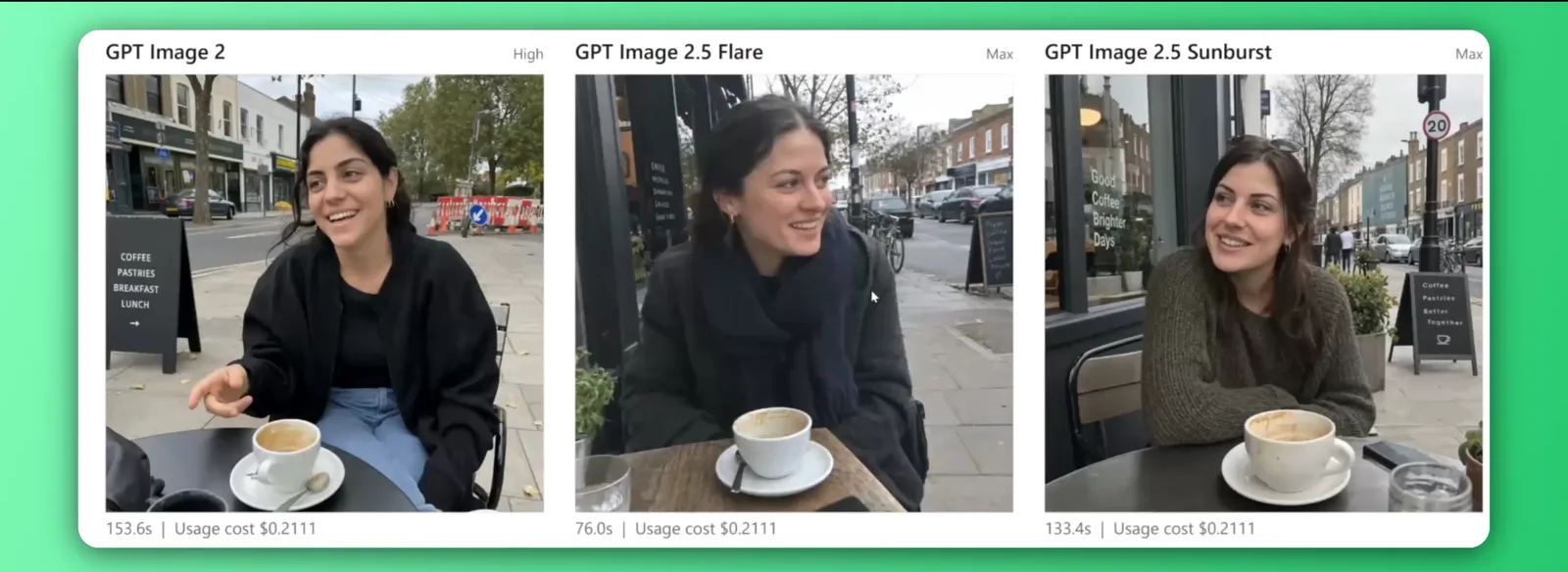
The built-in image generation of the recently released GPT image 2.5 is another standout; in my experience and across reviewer consensus, it generates genuinely usable results with accurately spelled text comparing to the older model and other AI model, avoiding the garbled lettering and bland stock-photo aesthetic that was so common just a few years ago. — see Can ChatGPT Make Pictures? for the actual workflow. On the writing side specifically, see How to Write a Blog Post With ChatGPT for a five-stage process that uses it for the parts it's genuinely good at.
The "Default AI Voice" Problem
There's a very specific, recognizable pattern worth knowing about before you start relying on ChatGPT for serious writing: when left unguided, it consistently overuses telltale words like "unleash," "delve," and "tapestry," resulting in text that feels stiff and robotic rather than sounding like your own voice.
Fortunately, in my hands-on testing, the fix proved to be straightforward. All it takes is giving ChatGPT explicit tone instructions—for instance, requesting "conversational" or "direct" language and specifically listing words to avoid—and then locking in that preference through its custom instructions or memory settings so you don't have to repeat yourself in every single conversation.
Where ChatGPT Falls Short
In my testing, the most universal complaint—and the direct answer to "what are the negatives of ChatGPT"—is that it can sound completely, confidently correct even when it is flat-out wrong. As a result, anything business-critical or strictly factual requires independent verification rather than blind trust.
Beyond that headline issue, my testing highlighted very concrete practical limits worth keeping in mind. The context window tops out around 196K tokens even on the highest tier tested, which falls well short of a key competitor's 1-million-token window. You also face strict usage caps that scale by plan rather than getting outright unlimited access—ranging from roughly 10 messages every 5 hours on the free tier up to a few thousand per week on paid tiers.
Finally, on the privacy front—which directly answers "what to never tell ChatGPT"—your conversation content is used to train future models by default (though an opt-out setting does exist). Plus, the company didn't publicly disclose a 2023 security breach until the following year. Taken together, these are more than enough reason to avoid sharing anything highly sensitive, proprietary, or legally risky inside a chat.
ChatGPT vs. Gemini: Which Should You Actually Use?
I put ChatGPT and Google's Gemini through the exact same battery of head-to-head tests—covering writing, coding, image generation, deep research, and voice—and ultimately awarding Gemini its Editors' Choice over ChatGPT. Gemini won for better overall value and its wider range of built-in integrations as the key differentiators.
That finding is worth taking seriously rather than glossing over just because this happens to be a ChatGPT review. In fact, our own dedicated Gemini review breaks down where Gemini specifically pulls ahead, particularly if you already live inside Gmail, Docs, and the broader Google ecosystem. If you're actively choosing between the two rather than defaulting to ChatGPT, I strongly recommend reading that head-to-head comparison before committing to either subscription.
Who ChatGPT Is For / Not For
For:
- Writers, coders, and researchers who want one capable tool across many different tasks rather than several specialized ones
- Anyone new to AI assistants, thanks to a genuinely low learning curve and clean default interface
- People who'll actually use the paid tier's advanced features (deep research, image generation, custom GPTs) regularly enough to justify $20/month
Not for:
- Anyone treating its output as fact without independent verification — the hallucination risk is real and named by every source
- Users who want the largest possible context window for very long documents — Gemini's is substantially larger
- Anyone with highly sensitive or legally risky information to discuss, given the default data-training policy
If you land in any of the "not for" cases above, see ChatGPT Alternatives for what to use instead — including which alternative fits which specific gap.
Where This Fits in the Wider AI Writing Toolkit
ChatGPT sits in the AI Writing Tools section, following Google Gemini — our own pick over ChatGPT, worth reading as a direct comparison — and QuillBot, a narrower paraphrasing-and-grammar specialist rather than a general-purpose competitor.
Frequently asked questions
What are the negatives of ChatGPT?
It can sound confidently correct while being factually wrong, so anything important needs independent verification. Other recurring complaints include occasional generic or repetitive output on unguided prompts, usage limits on lower tiers, and questions about how conversation data is used for training.
What to never tell ChatGPT?
Avoid sharing anything highly sensitive, legally risky, or something you wouldn't want potentially used to train future models or surfaced in a legal proceeding — conversation content is used for training by default, and OpenAI has previously been slow to disclose a security incident.
Is ChatGPT free and safe?
A free tier exists and covers everyday tasks like drafting and answering questions, though with usage limits. It's generally safe for typical use, but shouldn't be treated as a source of absolute truth or trusted with highly sensitive information without caution.
Is ChatGPT really worth it?
For most people who'll actually use its advanced features regularly, yes — it remains one of the most capable, versatile AI assistants available. Whether the $20/month Plus tier specifically is worth it depends on how often you'd use features like deep research, image generation, or custom GPTs beyond what the free tier allows.
What are some other websites, apps, or artificial intelligence tools like ChatGPT?
Claude, Google Gemini, Perplexity, Grok, and Microsoft Copilot are the ones most people land on. Which one actually fits depends on the job — see our full ChatGPT Alternatives breakdown for which alternative wins on coding, research, cost, or context length.
Ready to try ChatGPT Plus?
We may earn a commission when you buy through links on this page. It never changes what we recommend, and the price you pay is the same either way. How we make money
More on ChatGPT Plus
Can ChatGPT Make Videos?
Can ChatGPT Make Pictures?
Free AI Like ChatGPT
Best ChatGPT Alternatives
Write a Blog Post With ChatGPT, Not Like ChatGPT
(keep reading)
Typefully Review
Typeless Review
WriteHuman AI Review
Get the AI tool roundup.
One email a week: what launched, what is actually worth paying for, and what to cancel. No hype, no spam.
Unsubscribe any time. We never sell your email.