TopView AI Review: Output Quality, Limits and Pricing
TopView AI is an AI video ad generator that suits high-volume UGC-style ad testing and does not suit brand-critical or avatar-realism-dependent work.
We may earn a commission when you buy through links on this page. It never changes what we recommend, and the price you pay is the same either way. How we make money
TopView AI is worth it for high-volume UGC-style ad testing, not for brand-critical work or work that depends on avatar realism.
TopView AI is worth paying for when the work is high-volume UGC-style ad testing. It is not worth paying for in brand-critical work or work that depends on avatar realism. Plans start at $6.7 a month billed annually, and a 30-second clip costs $3.61 on Ultra and $8.19 on Plus. TopView AI is a web tool that turns a product link, image or prompt into an avatar-led short ad. TopView AI is not TopView, the New York sightseeing bus company, but it is one of the top four tools reviewed on the site for UGC & Product Ads.
Trustpilot reports a score of 4.0/5 from 336 reviews, but my personal experience with the platform warrants a 4.5/5 rating. Below, I'll break down the factors that led me to this assessment. TopView AI's pricing page and FAQ detail subscription plans, pricing, and credits, while its Terms of Service outline refund, account closure, tax, and prohibited-use policies. TopView gave no account for this review. The site pays for its own plan and earns an affiliate commission if a reader buys through its link.
A reader who buys through that link pays before the first usable ad exists. The sharpest flaw is that every regeneration spends credits again. A buyer who already knows TopView AI is deciding whether to pay, so the review starts with fit. The review covers who TopView AI is worth paying for, then output quality and limits, then the plans and credits. Further down, it answers whether TopView AI is legitimate and how it compares with Creatify and Arcads. It also covers how to cancel and get a refund, and what a plan covers besides ads. Short answers follow on the free plan, credit expiry, commercial use, HeyGen and the wrong choice.
Who Is TopView AI Worth Paying For?
TopView AI is worth paying for when the work is high-volume UGC-style ad testing. A variant costs $0.12 to $0.27 per second. The prices are USD per second of Seedance 2.5 720P video, as of 2026-10-01. Best fit here means testing many ad variants at volume.
Volume sorts the buyers into two groups: three it fits, then three it does not. Each one gives the group and the reason.
- Ecommerce sellers testing variants: the per-second price keeps many small variants affordable.
- Affiliate marketers: link-to-video turned an Amazon listing into a draft in about 1 minute 50 seconds.
- Small agencies: Ultra covers 416 seconds of Seedance 2.5 720P a month for $50 billed annually.
- Brand-critical ads: lip-sync drifts in longer clips and hands distort in some frames. Skip TopView AI here.
- Avatar-realism work: other tools lead on realism and languages. Skip TopView AI here.
- Buyers who need documented security: the pricing page carries no SOC 2 statement. Skip TopView AI here.
Skipping is not the whole story, because the strongest strength sits beside the worst fact. First drafts arrive in minutes on paid credits, and each regeneration spends credits again. Both facts show in the clips themselves, so output quality comes next.
How Good Is TopView AI's Output?
In my runs, TopView AI's output was usable first drafts for short-form ads, with lip-sync drift and hand artefacts. A usable first draft here means a vertical ad video ready to review, not a finished brand asset.
A first draft showed four strengths, ordered from the most to the least consistent across my runs.
- Gives fast first drafts: a draft arrives in minutes on paid credits.
- Builds a draft from a product link: the link-to-video feature turns a listing into a complete clip.
- Fits a beginner workflow: the template-driven structure needs no timeline skills.
- Cuts the cost per video: the pricing section below prices each plan by the second.
Cost aside, while some outdated reviews criticized TopView AI for producing repetitive scripts, my testing showed the opposite. The platform generated diverse and creative scripts with distinct hooks, messaging, and calls to action across multiple videos. These results indicate that TopView AI has evolved considerably and has made meaningful improvements to its AI script-generation system.
Besides that, all of my workflow is done in the AI Video Agent, a chat-based assistant that automatically plans scenes and picks a model from my brief. TopView uses three features to turn a brief into output: avatars, link-to-video, and the product tools.
How Natural Do TopView AI Avatars Look?
TopView AI avatars look least natural in lip-sync and body movement. In longer clips the mouth drifts from the audio and gestures repeat.
Gestures aside, natural here means in sync with the audio, varied in gesture and clean in the hands. Six findings follow: four from my clips, then two from other users' reports.
- Drifting lip-sync: the mouth falls out of step with the audio, most visibly in longer clips.
- Uneven sync across clip types: general avatar clips showed poor lip-sync, but a product-in-hand clip synced precisely.
- Unnatural movement: avatar movements looked unnatural in places.
- Distorted hands: hands distorted in some frames of a perfume ad clip.
- Formulaic gestures: a G2 reviewer quoted by Promer calls Avatar 2 and 4 movements "still quite formulaic".
- Repeated gestures: Wink reports repetitive gestures and lip-sync complaints from the reviews it reads.
Check the video below to see how the avatars look:
Complaints aside, link-to-video is a standout feature of TopView AI, so it comes next.
How Well Does TopView AI's Link-to-Video Work?
TopView AI transformed my iPhone Duo product brief into a complete ad video in about two minutes. The output was review-ready with no manual editing required. After providing product information and key selling points, TopView AI visited the product page, then pulled the needed resources, wrote the script, selected an avatar, generated a voiceover, and assembled a polished short-form advertisement.
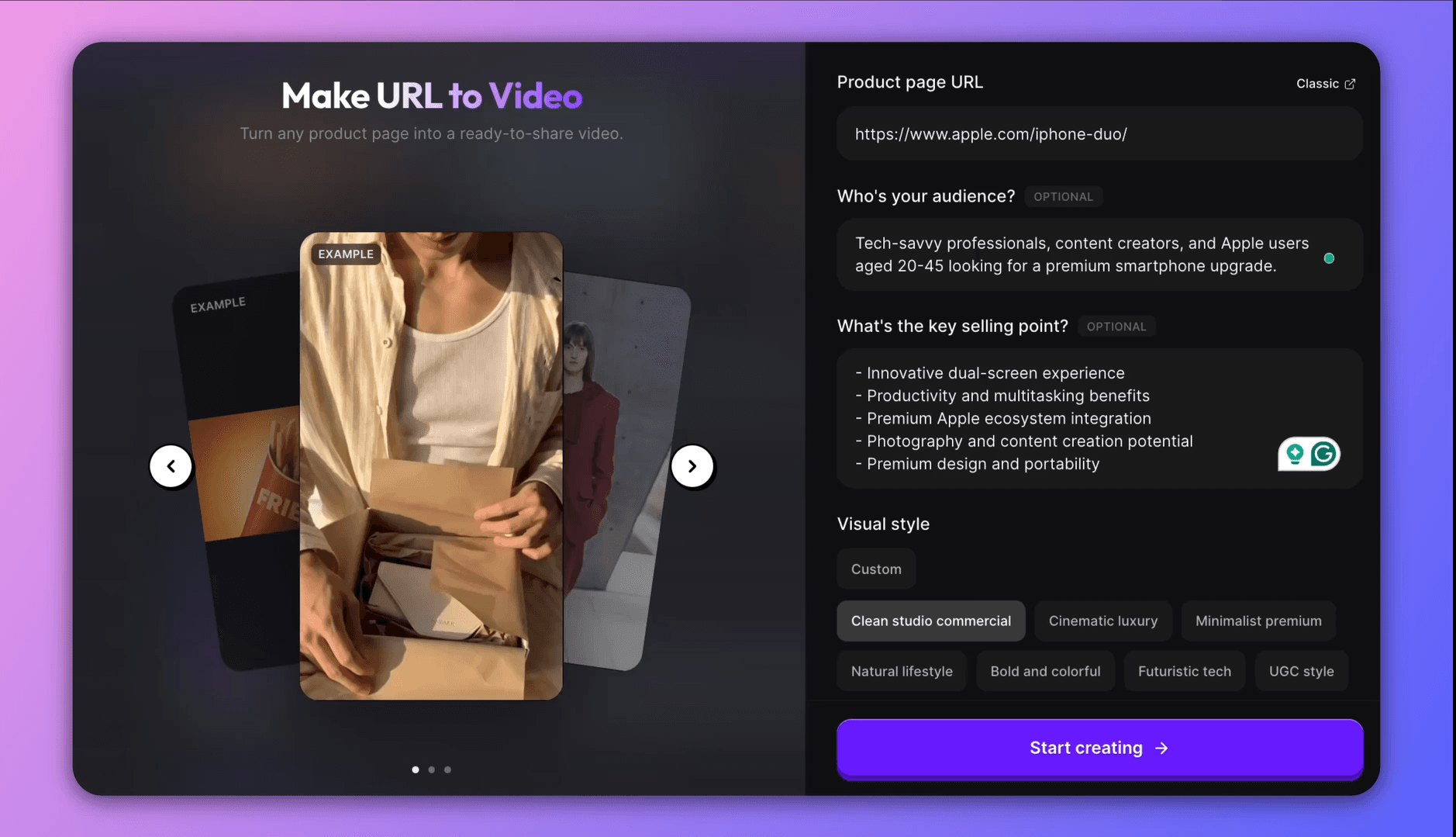
Voice quality aside, my tests focused on different iPhone Duo marketing angles and audience segments rather than product links. A weak product page gives a weak video, because the tool builds the draft from the listing's images and copy. The product tools take that draft further.
How Well Do TopView AI's Product Avatar, Replacement and AnyShoot Work?
Product Avatar, Product Replacement and AnyShoot worked well in most runs. The fit looked slightly off for some product shapes and sizes, and brush placement took trial and error. Product Avatar puts a still product in an AI presenter's hands. Product Replacement swaps a product into a library video. AnyShoot places a product into a styled scene or onto a model, with brush placement. The video below is a demonstration of how this feature works.
Placement has a cost too: a 5-second Kling 2.6 clip costs 3.25 credits. A 4-second Veo 3.1 Fast clip costs 3.6, and a 5-second Seedance 2.0 Fast clip costs 2.
None of that changes how the fit holds, which depends on the product's shape and size. TopView AI Product Avatar covers shape, size, auto or manual placement and credits per clip. The verdict holds for all three tools. The limits it leaves open come next: credits, render waits and control.
Where Does TopView AI Fall Short?
TopView AI falls short in three places: credits run out, renders queue and control is limited. A limit here means a point where the paid plan stops delivering. The vendor's own wording on queues is that waiting time varies. Three limits follow, in the order the sections below treat them: credits, render waits and control.
- Credits run out: regenerations drain the allowance.
- Renders queue: Unlimited Mode waits stretch from minutes to hours.
- Control stops short: there is no timeline editor and no voice preview.
How Fast Do TopView AI Credits Run Out?
TopView AI credits run out after two 15-second clips on Basic's 50 monthly credits. Every regeneration spends credits again. A 15-second Seedance 2.5 720P clip costs about 23 credits on Basic and Plus (15 / 0.66 = 22.7). The same clip costs about 18 on Ultra (15 / 0.83 = 18.1).
When I had to regenerate a clip to fix the lip-sync, I noticed my credits disappeared surprisingly quickly. I did a quick calculation: generating a 15-second Seedance 2.5 clip in 720P costs about 23 credits on the Pro plan. Under the current promotional pricing, the same clip works out to around 19 credits on both the Business and Ultra plans.
Discounts aside, failed generations occurred in my runs. Neither the pricing page nor its FAQ says whether a failed generation costs credits. Credit expiry has its own answer below. Each regeneration is another render and another wait.
How Long Do TopView AI Renders Take?
Renders took about 2 to 5.5 minutes on paid credits, and customers report hours or more in Unlimited Mode. During my testing, I tracked how long each task actually took to complete and compared it with the estimated time displayed by the platform:
| Clip | Plan or mode | Model | Shown estimate | Actual wait |
|---|---|---|---|---|
| Link-to-video clip from Iphone Dou product page | Paid credits | Seedance 2.0 | 2.5 min | About 1 min 50 s |
| Product-in-hand clip | Paid credits | Seedance 2.0 | 5.5 min | About 2 min 10 s |
| Avatar clip | Paid credits | Seedance 2.0 | 21 min | About 5.5 min |
| Credit Mode, as reported by Trustpilot reviewers | Credit Mode | Seedance 2.0 | 20 min | 10 to 15 min |
| Product-in-hand image | Free account | Seedance 2.0 | About 2 min 15 s | Over 14 min |
| Unlimited, as reported by customers (Wink, six requests; Trustpilot reviewers) | Unlimited | Seedance 2.0 | None stated | 14 to 68 hours, and a day or more |
The table runs from the shortest wait to the longest, and only the last two lines are customer reports. The vendor's own queue rule explains the gap. Unlimited generations wait in the standard queue, and the pricing page lists priority processing on the higher tiers, so that there will be longer waits in rendering queues at peak times. That's the answer to a viral video titled "The TopView AI Scam: Unlimited Means a 16-Hour Wait" and Reddit's complaint.
What Control Does TopView AI Lack?
TopView AI lacks a voice preview before generating, a free-form structure, and a timeline editor. Control here means editing the result after generation. I found three gaps, ordered by consequence.
- No voice preview: the voice is heard only after generating, so credits are spent to find out.
- Template-driven structure: specific elements stay editable, but the ad follows a template.
- No timeline editor: trimming and reordering clips needs another tool.
Some older reviews also cite the lack of a mobile app as a drawback, but that information is now outdated. TopView now offers its own app, so the key differences between plans come down to credits, features, and usage limits, so the plan ladder comes next.
What Does Each TopView AI Plan Cost in 2026?
TopView AI sells five plans, from $6.7 a month on Basic to $56 a seat on Team, billed annually. Plus costs $18, Business $44 and Ultra about $50, all promotional, read on 2026-10-01 and 2026-10-05. The table lists the five plans in ascending order of annual price.
| Plan | List monthly price | Annual price per month | Credits and period | Concurrent tasks | Unlimited video models and days |
|---|---|---|---|---|---|
| Basic | $18 | $6.7 ($80 a year) | 50 a month | 4 | None for video |
| Plus | $36 | $18 ($216 a year) | 100 a month | 4 | None for video |
| Business | $75 | $44 ($528 a year) | 3,000 a year, delivered at once | 8 | 7 days on Kling 2.6, Kling O1 Video Edit, Kling Motion Control and Seedance 1.0 Pro Fast |
| Ultra | $150 | About $50 ($599.9 a year) | 500 a month | 12 | 30 days of Seedance 2.5 and 2.0 at 720P |
| Team | $180 per seat | $56 per seat ($672 a year) | 500 a month per seat | 30 (12 unlimited and 18 paid) | 60 days of Seedance 2.5 and 2.0 at 720P |
Credits cut the ladder three ways in the next three sections. The sections cover what one credit buys, what Unlimited means and which plan fits each workload. The live plans sit on the TopView AI pricing page.
What Does One Credit Buy on TopView AI?
One credit buys 0.66 seconds of Seedance 2.5 720P video on Basic and Plus. Business buys 0.77 seconds, and Ultra and Team buy 0.83. A credit is TopView's unit of spend, and the table measures what that unit returns on each plan.
| Plan | Seconds per credit | Cost per credit | Cost per second | Cost of a 30-second clip |
|---|---|---|---|---|
| Basic | 0.66 | $0.133 | $0.202 | $6.06 |
| Plus | 0.66 | $0.180 | $0.273 | $8.19 |
| Business | 0.77 | $0.176 | $0.229 | $6.87 |
| Ultra | 0.83 | $0.100 | $0.120 | $3.61 |
| Team | 0.83 | $0.112 | $0.135 | $4.04 |
The table uses the annual price paid and credits and seconds per year (the monthly allowance times 12), read 2026-10-01.
Prices differ by plan: Ultra costs $0.120 a second. Team costs $0.135 a second per seat, Basic $0.202, Business $0.229 and Plus $0.273 a second. The tier discount on Seedance 2.5 720P explains the spread. Business gets 13% off, and Ultra and Team get 20%.
What Does "Unlimited" Mean on TopView AI?
TopView AI defines Unlimited as credit-free access, not priority speed, and waiting time varies. The pricing page says Unlimited "defines credit-free access, not priority speed". Unlimited covers the models, resolutions and tiers listed on a plan card, in the web interface.
The interface rules aside, the pricing FAQ sets the queue rules. Unlimited generations run in the standard queue, and credit-based generations run in the priority queue. Generating videos only in Unlimited Mode may lower the priority of later Unlimited tasks. Credit Mode bypasses the queue. Speed and concurrency vary at peak times, and Ultra allows up to 6 unlimited video tasks at once.
Unlimited usage is limited to personal use through the web interface and excludes API access, automation, and reselling. Refund windows vary by plan and are shown in the comparison table below, and the value of any Unlimited usage may be deducted from eligible refunds.
Which TopView AI Plan Is Best for Each Workload?
The best plan for a single test is Plus at $18 a month billed annually. A weekly batch fits Ultra at $50. An agency run needs four Ultra plans at $200 or four Team seats at $224. The table is an example.
The example uses a covering plan: a plan whose monthly allowance meets the seconds a scenario needs. The inputs are Seedance 2.5, 720P and 15-second clips with no retries, which is optimistic. Volumes are 4, 20 and 100 clips a month. A scenario is priced on one plan where that plan covers it. Otherwise it takes the cheapest count of the same plan.
| Scenario | Seconds needed a month | Covering plans and monthly cost | Unlimited window | Cheapest covering plan |
|---|---|---|---|---|
| Single ad test (4 clips) | 60 | Plus $18, Business $44, Ultra $50, Team $56 | None on Plus, 7 days on Business, 30 days on Ultra, 60 days on Team | Plus at $18 |
| Weekly batch (20 clips) | 300 | Ultra $50, Team $56 | 30 days on Ultra, 60 days on Team | Ultra at $50 |
| Agency run (100 clips) | 1,500 | Four Ultra plans $200 or four Team seats $224 | 30 days on Ultra, 60 days on Team | Four Ultra plans at $200 |
Monthly allowances are 33 seconds on Basic, 66 on Plus and 416 on Ultra and Team. Business holds about 192, as a yearly pool of 2,307. Whether several Ultra accounts are allowed is not stated, so the table shows both agency options.
Cost aside, buy Ultra first for weekly batches, and start on Plus for a single test, through TopView AI. The cheapest plan still leaves the question of whether TopView AI is legitimate enough to trust with a card.
How Legitimate Is TopView AI?
TopView AI is legitimate as an operating service with mixed ratings. Trustpilot shows 4.0 from 336 reviews on 2026-10-24. Legit here means an operating company that delivers what it sells, under disclosed terms.
| Platform and source | Rating | Count | Date | Note |
|---|---|---|---|---|
| Trustpilot, via Wink | 3.5 | 147 | 2026-09-08 | Article date |
| Trustpilot, via Reloop | 3.8 | 187 | 2026-09-15 | Article date |
| Trustpilot, via Promer | 3.9 | 257 | 2026-09-29 | Replies to 62% of negative reviews |
| Trustpilot | 3.9 | 267 | 2026-10-01 | Replies to 57% of negative reviews |
| Trustpilot, Google snippet | 3.9 | 278 | 2026-10-05 | Header numbers did not extract on the page |
| Trustpilot | 4.0 | 336 | 2026-10-24 | Read direct; paid profile, claimed May 2025 |
| G2, via Promer or Wink | 4.8 | 6 or 7 | 2026-09-08 and 2026-09-29 | G2 page not read |
| Product Hunt | 3.7 | 6 | 2026-10-05 | Search snippet |
Claims aside, Trustpilot lists the company in Singapore. I found no SSO or SOC 2 information. The Team card lists an SSO add-on through sales, and the pricing page carries no SOC 2 statement. The Terms, last updated 2026-09-09, let TopView train its models on user content by default. Enterprise customers are excluded, and users opt out by email to support@topview.ai.
Users who opt out rely on the Terms, one of four things that move the legitimacy answer. The others are the dates, who invites the reviews and the company address. The ratings answer only in summary, and Is TopView AI Legit? works through the rest. A buyer weighing the ratings asks what else exists.
How Does TopView AI Compare With Creatify and Arcads?
Creatify and TopView AI both draft ads from a product URL, and Arcads is built for long talking-actor ads. Same job here means drafting an ad video from a product link.
| Tool | Built for | Price from | Free tier | Avatar or actor library | Editing control |
|---|---|---|---|---|---|
| TopView AI | Product-link ads and avatar clips at volume | $18 a month list, $6.7 a month billed annually (Basic, read 2026-10-01) | No free card on the pricing page, and sources disagree on the credits | Sources disagree: 2,000+ avatars (Unite.AI) against 500+ (MobileAppDaily), and the page gives no count | Template-driven, with no timeline editor and no voice preview |
| Creatify | Ad variations from a product URL | $39 a month (Starter, checked 2026-09-02) | Yes, 10 credits a month | Up to about 1,500 actors | Automated assembly with no full manual timeline |
| Arcads | Long talking-actor ads of 45 to 60 seconds | $110 a month (no public pricing page, no price date) | No | 1,000+ actors | No built-in editor, so finishing happens in another tool |
The Creatify AI review works through the product-URL draft. The Arcads AI review covers the 45 to 60 second talking-actor format.
Which tools replace TopView AI turns on price from, free tier and editing control, TopView AI Alternatives compares them. TopView AI vs Creatify runs the pair head to head.
Either pair means moving to another tool. That means cancelling TopView AI and paying for a new plan while the unused balance stays behind.
How Do You Cancel TopView AI and Get a Refund?
Cancel TopView AI from the account settings and keep access to the end of the billing period. Ask for a refund within three days of purchase if no credits are used. The pricing FAQ and the Terms, last updated 2026-09-09, state these rules, read 2026-10-05. Cancelling is not the same as closing: closing ends the account itself.
Closing aside, the rules run in the order a buyer meets them.
- Cancel: the subscription renews automatically until it is cancelled in the account settings.
- Refund: request it within three days of purchase, with no reason, if the payment's credits are unconsumed. The Terms deduct the value of Unlimited tasks completed from any refund.
- Close: closing the account takes effect immediately and forfeits remaining credits without a refund. The billed subscription is cancelled, so no later period is charged. The current billing period is not refunded, and the email address cannot register again.
- Team: Team memberships follow the standard refund policy.
- Store billing: cancel an Apple App Store or Google Play subscription in the store.
Store billing changes the exact steps, and so do monthly or annual billing, credits used and Team. How to Cancel TopView AI lays out the steps.
Steps aside, every plan's account holds more than credits. Team workspace content passes to the team owner. TopView retains the minimum billing, tax and legal records the law requires. A plan covers more than credits too, which the next section lists.
What Does a TopView AI Plan Cover Besides UGC Ads?
Every individual plan card lists "Access to all in-platform features", so the other products come with a plan. Only live streaming bills separately. Plan here means the subscription card on the pricing page. Every product below belongs to one multi-model platform. What is TopView AI? works through the products, the models and who each one is for. Five items follow, ordered by how close each sits to the page's job.
- Plans scenes with the Topview Agent V2: the agent picks a model from a brief. TopView AI Video Agent covers credits per run, model and clip length.
- Builds films and dramas in the studios: the studios appear in video titles on the search results.
- Runs AI live streaming: Cost about $1.5 an hour.
- Connects through MCP and the API: Ultra and Team plan credits do not cover API calls.
- Starts from a product link: choose the audience and selling point, generate a draft and repair weak parts. How to Use TopView AI walks through plan, model and ratio.
Questions about the plan itself, from the free tier to commercial use, follow as short answers.
What Else Do Buyers Ask About TopView AI?
Buyers ask five short questions about TopView AI. They cover the free plan, credit expiry, commercial use, the avatar comparison and the wrong choice.
Is There a TopView AI Free Plan?
The pricing page does not include a free plan, but you received 10 trial credits to test a limited set of TopView features. The free credits are mainly limited to image-generation features rather than video creation. Free exports carry a watermark, and commercial use is covered below.
Free credits lead into the paid ladder and into promo codes. The free plan brings a small credit grant of disputed size, a watermark and no commercial use. TopView AI Pricing works through credits one-time or monthly, promo codes and top-up packs valid for 24 months. Top-up packs and free credits both raise the next question: when credits expire.
What Is the Expiry Rule for TopView AI Credits?
On monthly plans, unused credits do not roll over, and the Terms state no expiry. Credits carry over when a plan upgrades or switches from monthly to annual. Ultra Annual's monthly credits expire at the next grant. Business annual credits arrive all at once, and top-up credits last 24 months.
Is Commercial Use Allowed on TopView AI Videos?
Not on the free plan: free users may not use TopView for any commercial purpose, including advertising (Terms, Prohibited Uses). Commercial use here means using an output in advertising or for sale.
Paid plans fall outside that commercial clause. The pricing page's feature table has a Commercial license row, and its marks did not extract as text.
Which Is Better for Avatars, TopView AI or HeyGen?
HeyGen leads on avatar realism and languages, and TopView AI leads on product ads from a link.
The HeyGen review holds the site's own finding: from $29 a month, free tier yes, checked 2026-09-01. Realism, languages and price from decide the pick, and TopView AI vs HeyGen runs the pair. When neither pick fits, the next question is when TopView AI is the wrong choice.
Is TopView AI Ever the Wrong Choice for UGC Ads?
No, TopView AI can generate usable UGC Ads; however, it may not be suitable for 3 groups I mentioned above. The groups are brand-critical ads, work that depends on avatar realism, and buyers who need documented security. For brand-critical work, Synthesia may be better; read its reviews here.
An alternative for buyers who want many models rather than an ad workflow turns the question into price per second. TopView's own table, dated 2026-08-07, claims Higgsfield costs $0.218 per second of Seedance 2.5 720P against TopView's $0.12. TopView AI vs Higgsfield works through model choice and price per second.
A buyer who fits none of the three price groups needs the wider field. AI tools for UGC ads compares the category and what a usable ad costs. TopView AI is the wrong choice for one polished brand video, and the right one for high-volume UGC testing.
Conclusion
TopView AI is worth paying for when the work is high-volume UGC ad testing and the plan fits the budget. See the live plans at TopView AI, or read the comparison above first.
Ready to try TopView?
We may earn a commission when you buy through links on this page. It never changes what we recommend, and the price you pay is the same either way. How we make money
More on TopView
TopView AI Legitimacy: Reviews, What Users Report and Safety
TopView AI Alternatives: Compared by Price, Output and Fit
(keep reading)
Blort AI Review: Research Quality, Credits and Pricing
Focal Review
Akool Review
Get the AI tool roundup.
One email a week: what launched, what is actually worth paying for, and what to cancel. No hype, no spam.
Unsubscribe any time. We never sell your email.