Arcads AI Review
Arcads' 1,000+ AI actors tested against three other AI ad generators: what works, where physical products fail, and the real cost per finished video.
We may earn a commission when you buy through links on this page. It never changes what we recommend, and the price you pay is the same either way. How we make money
Arcads is worth it if you're a performance marketer running talking-actor UGC ad tests at volume on ads 45-60 seconds long. It's a weak fit for short-form or physical-product ads. I tested it and landed on that conditional yes rather than a blanket one.
Is Arcads AI Worth It?
Arcads is worth it if you're a performance marketer running talking-actor UGC ad tests at volume, on ads 45 to 60 seconds long. It's a weak fit for short-form or physical-product ads. I tested Arcads with that specific use in mind: Meta and TikTok ad creative at $1,000 or more a month in spend. At that budget, it paid for itself within a week.
If you're a YouTuber or casual creator, skip it. The $110-a-month entry price is steep for occasional use, and InVideo or CapCut cover the same ground for less. The line that matters most isn't spend, it's ad length. Arcads bills every clip as if it ran a full minute, regardless of actual length, so a 45 to 60 second ad with several distinct faces makes financial sense. A 10 to 20 second ad doesn't.
What Is Arcads AI?
Arcads is a text-to-video platform that turns a written script into a finished UGC-style ad, with an AI actor speaking on camera. Freshr operates the platform; Romain Torres and Dylan Fournier founded it. I tested Arcads the way a marketer would use it: producing ad creative for Meta and TikTok, aimed at ecommerce brands, SaaS companies, app studios and agencies.
The platform has changed a lot since 2025. Older coverage treats Arcads as a single-purpose AI actor generator: script in, talking-head video out. That's not what I found. By the time I tested it, Arcads ran a catalogue of 8 image models, 11 video models and 3 talking-actor models, plus more than 30 standalone tools. Anyone reviewing the 2025 version and anyone reviewing what I tested are, functionally, looking at two different products under the same name.
| Attribute | Value |
|---|---|
| Core function | Text-to-video UGC ad generation |
| Operator | Freshr |
| Founders | Romain Torres, Dylan Fournier |
| Target audience | Ecommerce, SaaS, app studios, agencies |
| Actor library | 1,000+ advertised |
| Language support | 30-35+ languages |
| Talking-actor engines | 3 (Arcads 1.0, Audio-Driven, OmniHuman 1.5) |
| Video models included | Sora 2, Veo 3.1, Kling 3.0, Seedance 2.0, and others |
Arcads' AI Actors and Model Lineup
Arcads' actor and model lineup is what sets it apart from single-model competitors. The library runs three separate talking-actor engines, and I got access to eight external image models and eleven external video models under one subscription. That's a broader lineup than any other AI UGC tool I've covered in this cluster.
The Actor Library
Arcads advertises a library of more than 1,000 AI actors, spanning a range of ages, genders, skin tones and background settings. I confirmed that range directly, and found a filtering system for narrowing the library by those same attributes.
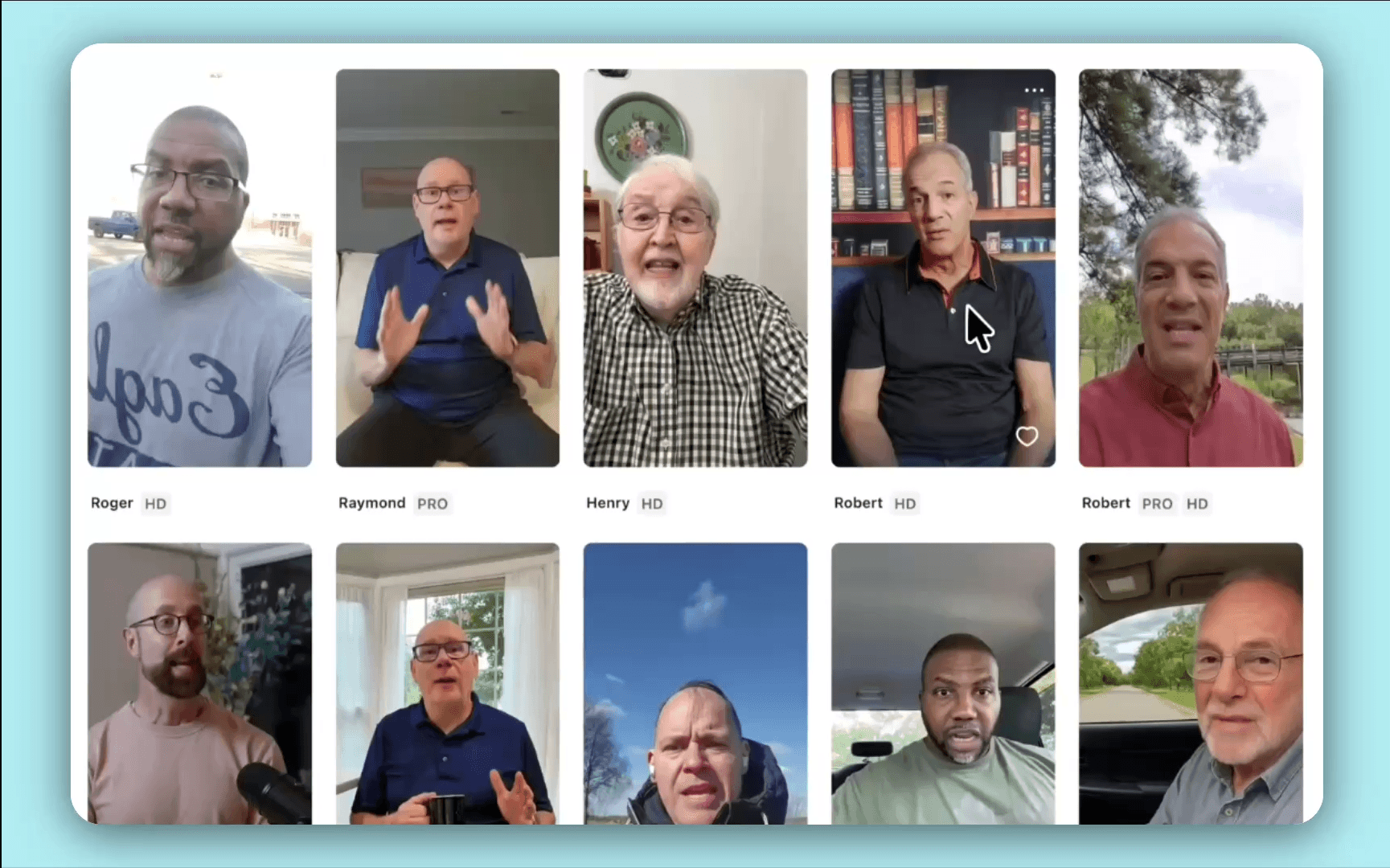
The full 1,000-actor library isn't available on every plan. I found Arcads gates the library by tier: roughly 300 actors on the entry-level Starter plan, with the full 1,000+ library reserved for higher tiers. Arcads doesn't publish this gating structure itself, so I only caught it by checking each tier directly. That matters if you're pricing Arcads off the advertised 1,000-actor figure alone.
The Three Talking-Actor Engines
Arcads runs three separate engines for talking-actor video, each suited to a different script length and delivery style.
| Engine | Arcads' stated best use | Reported characteristic |
|---|---|---|
| Arcads 1.0 | Scripts over 1,500 characters | Credit-efficient default |
| Audio-Driven | Existing voiceover, uploaded audio | Lip-sync described by Arcads as "more natural / realistic" |
| OmniHuman 1.5 | Scripts under 400 characters | Most expressive; full-body gestures |
Arcads' own platform guide describes Audio-Driven as the engine with the most natural lip-sync, which by implication makes the other two less natural on that specific measure. I didn't generate the same script through all three engines and compare the results side by side this round, so the differences above come from how Arcads itself describes the engines, not from my own direct comparison.
Clip length is also engine-dependent. Arcads 1.0, Audio-Driven and OmniHuman 1.5 carry no hard duration limit, while the underlying video models do: Sora 2 Pro caps at 20 seconds, Kling 3.0 at 15 seconds and Veo 3.1 at 8 seconds. An auto-extend feature adds 7 seconds per pass, up to a 30-second input, for a maximum of 37 seconds total.
Supported Image and Video Models
Beyond the three talking-actor engines, Arcads gave me access to third-party generation models under the same subscription. The video lineup includes Sora 2, Sora 2 Pro, Veo 3.1, Kling 2.6, Kling 3.0, Seedance 1.5, Seedance 2.0 and Grok Video. The image lineup includes GPT Image 1.5, GPT Image 2, Nano-Banana Pro, Nano-Banana 2, Seedream 4.5 and Seedream 5 Lite.
How Arcads Works
Producing a finished ad follows the same four steps every time: write or upload a script, choose an actor, generate the clip, then export it for further editing.
Writing and Uploading a Script
Arcads accepts a script through two input methods. Text-to-speech reads a typed script aloud in the actor's voice. Speech-to-speech records or uploads your own audio, and the actor's delivery mirrors it. Arcads has no built-in AI script writer, so I drafted mine in ChatGPT first and pasted it in. I also used Arcads' own free "Hook Generator" tool for opening lines.
Punctuation changes the delivery. Arcads' actor pacing is sensitive to it: an exclamation point produces an excited delivery, a comma or ellipsis produces a pause.
Choosing an Actor and Previewing the Voice
After the script, I filtered the actor library by age, gender, skin tone and setting, then previewed how the chosen actor's voice sounded against my specific script before spending any generation credits. That preview step saved me from spending credits on a voice that didn't fit. Credits only get charged once a video generates, not at the preview stage.
Speech-emotion settings sit at this same step. I turned on Arcads' "Add Speech Emotion" option, and the delivery sounded noticeably more natural than the flat, monotone default.
Generating and Exporting
Once I confirmed an actor and script, render time ran roughly 5 minutes per clip for videos between 15 and 30 seconds long, with individual generations sometimes landing in as little as 2 minutes. Using batch generation, I got ten videos done in roughly ten minutes. Output comes out as a downloadable 1080p MP4 file.
Arcads has no built-in video editor at export. I finished every clip in a separate tool, CapCut most of the time, to add captions, music or B-roll before publishing the ad.
Arcads Pricing and Billing
Arcads doesn't publish pricing on its homepage. I only saw plan prices after starting the account sign-up process, behind a paywall reached partway through onboarding.
The Plans
Starter runs $110 a month for up to 10 videos. Creator runs $220 a month for up to 20 videos. Pro is priced by custom quote and includes API access. The credit breakdown for each tier:
| Plan | Reported price | Reported credits | Roughly |
|---|---|---|---|
| Starter | $110/mo | 8,000 | ~10 one-minute videos |
| Creator | $220/mo | 16,000 | ~20 one-minute videos |
| Pro | $550/mo | 40,000 | ~50 one-minute videos |
At one point I also saw euro-denominated figures, a Starter plan at €100 a month and a Creator plan at €200 a month. That may reflect regional pricing rather than a contradiction of the dollar figures above. I haven't checked these against arcads.ai's current site since.
How the Per-Minute Billing Works
Talking-actor video bills at 800 credits per minute, per actor. Every clip's length rounds up to the next full minute, so a 15-second ad and a 60-second ad cost the same, roughly $11 either way on the Starter plan. I haven't run a side-by-side generation to confirm the exact round-up point myself, so treat that figure as the documented mechanic rather than something I clocked directly.
If it holds, it changes how a flat roughly-$11-per-video framing reads elsewhere: it understates the cost of a genuinely short ad and overstates the marginal cost of extending a longer one.
Credits don't roll over on the Starter or Creator plans. Once you use a plan's credit allocation, the account pauses generation until the next billing cycle.
Is There a Free Trial?
No. Arcads doesn't offer a free trial for video generation. Payment comes before you generate a single video, which feels like a real gap given the price point. Arcads does provide 100 free images a day from two image models, Nano Banana Pro and Seedream 4.0. A 24-hour change-of-mind refund exists too, but only if the account has generated zero videos.
AI video generation is expensive to run. A standing free tier would make the economics harder to sustain at Arcads' scale. That's my read on why it's missing, not an excuse for the gap.
What Arcads Does Well
Four things stood out during testing:
- Actor realism and variety. The 1,000+ actor library is the deepest I've seen in the purpose-built UGC category. Hand gestures, body language and voice all came across convincing enough that in most cases, nothing gives it away as AI.
- Generation speed. I got ten finished videos done in roughly ten minutes using batch generation, with individual clips landing in 2 to 5 minutes. It's one of the most consistently strong qualities of the platform.
- Cost relative to hiring a human creator. At roughly $11 a video, Arcads runs well under Fiverr listings for "UGC ad creator," which typically charge $80 to $200 or more per video with a multi-day turnaround. That puts Arcads at roughly a tenth of the cost, by my own math.
- Batch and Workflows automation. Workflows, launched in June 2026, is node-based automation that fans one script out across many actors and languages in a single run. It's the strongest differentiator if you're testing many creative variants at once.
A fifth point worth flagging: "Full Emotion Control" settings, tags such as persuasive, friendly or excited, visibly change an actor's facial expression and hand gestures. I used this to test a fear-based hook against a benefit-driven hook with the same actor and script.
Model breadth matters too. Getting Sora 2, Veo 3.1, Kling 3.0 and Seedance 2.0 under one subscription, each priced individually in credits, is a genuine convenience compared to the single-model tools I've tested elsewhere in this cluster.
Where Arcads Falls Short
One limitation showed up consistently: Arcads' actors struggle to handle physical products naturally. Three more limitations came up during testing too: no built-in editor, inconsistent output quality, and pricing that isn't published anywhere.
Physical Products and Unboxing
Arcads' AI actors don't reliably hold, unbox or demonstrate a physical product on camera. An actor doesn't showcase a product convincingly, which is why I'd point sellers of digital products, courses, coaching, software, templates, toward Arcads over sellers of physical goods. I tested the Unboxing POV preset directly and caught a missing wristband when an actor picked up a smartwatch in one generated clip.
Across roughly 30 campaigns and $450 in spend, I saw an approximate 20% failure rate on unboxing-preset output specifically, with product elements missing or rendered incorrectly. Arcads is built for a person talking about a product, not handling one.
For ads built around a physical product shown in hand, Creatify's URL-to-video workflow is built specifically around product imagery rather than actor delivery. See the Arcads Alternatives comparison for other options.
No Built-in Editor
Arcads has no timeline editor, caption tool or music library. I finished every generated clip in a separate application, mostly CapCut, before publishing it as an ad. Arcads' own site lists "AI Video Editing, Soon" as a planned feature. It hadn't shipped by the time I checked in August 2026.
Output Consistency
Roughly 30% of the actors I generated showed visible AI tells: robotic cadence, unnatural eye movement, stiff gestures. Only about the top 20% of a batch passed what I'd call a scroll test. Lip-sync drift showed up in around 15% of my videos, more pronounced in German and Hebrew specifically.
Who Arcads Is Right For
The decision comes down to what you're selling, not just who's buying. Sellers of digital products, courses, coaching, software, newsletters, get more value from Arcads than sellers of physical products. An AI actor talks about a digital product convincingly without needing to hold anything.
Buy Arcads If
I'd recommend Arcads specifically if:
- You're producing talking-head UGC ads at high volume
- Your ads run 45 to 60 seconds
- You need many distinct actor faces for hook-testing
- You're localising into several languages from one script
- $110 or more a month fits comfortably in your test budget
One more condition from my own testing: the product you're advertising is digital, not physical.
Skip Arcads If
Skip Arcads when:
- Your ads run 10 to 20 seconds, since round-up billing charges a full minute regardless
- Your product needs to be visibly and accurately shown in an actor's hands
- Your testing volume is low, since there's no free trial to offset the entry cost
- You need in-app editing, since Arcads has none
- You need the price before entering payment details, since Arcads publishes none
For any of these, check the HeyGen review, Synthesia review or the dedicated Arcads Alternatives comparison.
Arcads vs Other AI UGC Ad Tools
I've tested Arcads directly against two named competitors. HeyGen works better for corporate and LinkedIn-style content, but it's too polished-looking for TikTok-style UGC. Creatify is faster and cheaper for high-volume ecommerce testing through its URL-to-video workflow, though its actors and lip-sync aren't as realistic as Arcads'. Synthesia is the enterprise standard for training content, but it comes across too corporate and stiff for social ad testing.
I've written a dedicated HeyGen vs Arcads comparison covering avatar realism, script workflow and cost per finished ad in more depth than this section allows, plus full reviews of HeyGen, Creatify and Synthesia.
Is Arcads Legitimate?
Yes. Arcads announced a $16 million seed funding round in December 2025, led by Eurazeo with participation from Alpha Intelligence Capital and the Sequoia Scout program. The company serves more than 6,000 clients and generates roughly 100,000 video assets a month, and it's profitable as of my check.
User sentiment runs more mixed than the funding and client figures suggest. Arcads holds 140 to 160 Trustpilot reviews with a score in the 3.0-3.3 range. A closer look at 100 of those reviews found 43% five-star and 39% one-star, a sharply polarised split with little in between. No Arcads listing exists on G2, which is unusual for a company at this scale. The complaints I found cluster around billing, unexpected charges and cancellation requiring 72 hours' notice, rather than the product's core function.
Affiliate Program, API and Other Details
Arcads gave me access to a documented REST API covering products, folders, scripts and generation endpoints, plus an MCP server at mcp.arcads.ai that connects the platform to Claude as a custom connector. API access is limited to the top-tier plan, and Arcads doesn't publish separate API pricing.
Arcads runs a referral program, and the Arcads links on this page use it: a purchase through them earns us a commission at no extra cost to you. The affiliate disclosure explains how that works.
Arcads AI Review FAQ
What is Arcads AI?
Arcads AI is a text-to-video platform that turns a written script into a UGC-style ad video featuring an AI actor. I got access to third-party image and video models including Sora 2, Veo 3.1 and Kling 3.0 under the same subscription.
How much does Arcads AI cost per month?
Starter runs $110 a month for roughly 10 one-minute videos. Creator runs $220 a month for roughly 20. Pro is custom-priced and includes API access. Arcads doesn't publish these figures on its own site; I only saw them at sign-up.
Can I use Arcads AI for free?
No standing free trial exists for video generation. Arcads gives you 100 free images a day from two image models, and a 24-hour refund window if you haven't used any credits.
Does Arcads have an API?
Yes. I used a documented REST API and an MCP server, both gated to the top-tier plan.
Does Arcads offer an affiliate program?
Yes. Arcads runs a referral program, and the Arcads links on this page use it. A purchase through them earns us a commission at no extra cost to you.
Ready to try Arcads AI?
We may earn a commission when you buy through links on this page. It never changes what we recommend, and the price you pay is the same either way. How we make money
More on Arcads AI
Arcads Alternatives
(keep reading)
TopView AI Legitimacy: Reviews, What Users Report and Safety
TopView AI Alternatives: Compared by Price, Output and Fit
Get the AI tool roundup.
One email a week: what launched, what is actually worth paying for, and what to cancel. No hype, no spam.
Unsubscribe any time. We never sell your email.