TopView AI Product Avatar: How It Works and Where the Product Fit Breaks
How the TopView AI Product Avatar works, what a video costs in credits and dollars, and where the product fit breaks, per three published reviews.
We may earn a commission when you buy through links on this page. It never changes what we recommend, and the price you pay is the same either way. How we make money
The TopView AI Product Avatar turns one product image into a video of an AI presenter holding the product. The fit breaks on some product shapes and sizes. Product Avatar is a feature of the AI video ad generator described in the TopView AI review. A presenter video costs credits twice, once for the image and once for the video.
This page covers what Product Avatar is, how it works and the credit cost. It also covers where the fit breaks, how to improve it and how it differs from the other avatar tools. Further down, it answers how long a run takes and whether it is free. It also covers your own photo and Off-Peak mode.
What Is TopView AI Product Avatar?
Product Avatar is TopView AI's feature that combines one product image with an AI avatar. The avatar holds, shows or interacts with the product, per the official guide. An avatar here means an AI-generated presenter.
Presenter video is the output: a UGC-style ad video with no influencer, actor or crew. TopView says it introduced the concept in early 2025, as Promer quotes the page. Product Avatar sits beside Avatar 4, Video Lip-Sync and Design My Avatar in the guide. The older Avatar 2 era is gone. Avatar 4 is the current action mode.
Modes aside, the steps matter first, so the next section walks through them.
How Does TopView AI Product Avatar Work?
Product Avatar takes three steps: choose an avatar template, upload the product image, then create the avatar video.
- Step 1 picks a template by category, uses your own photo or generates one.
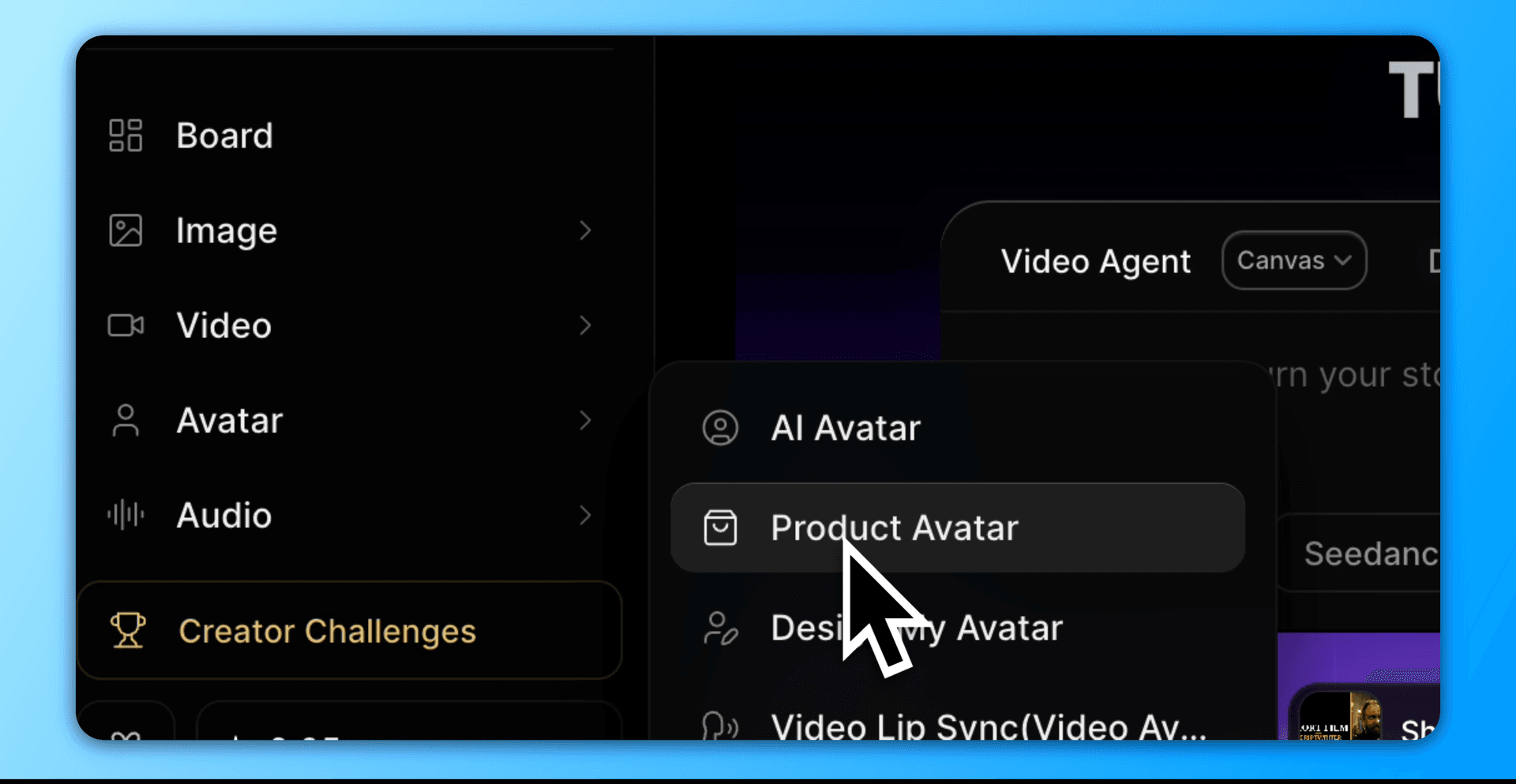
- Step 2 uploads the product image and chooses Auto Mode or Manual Mode.
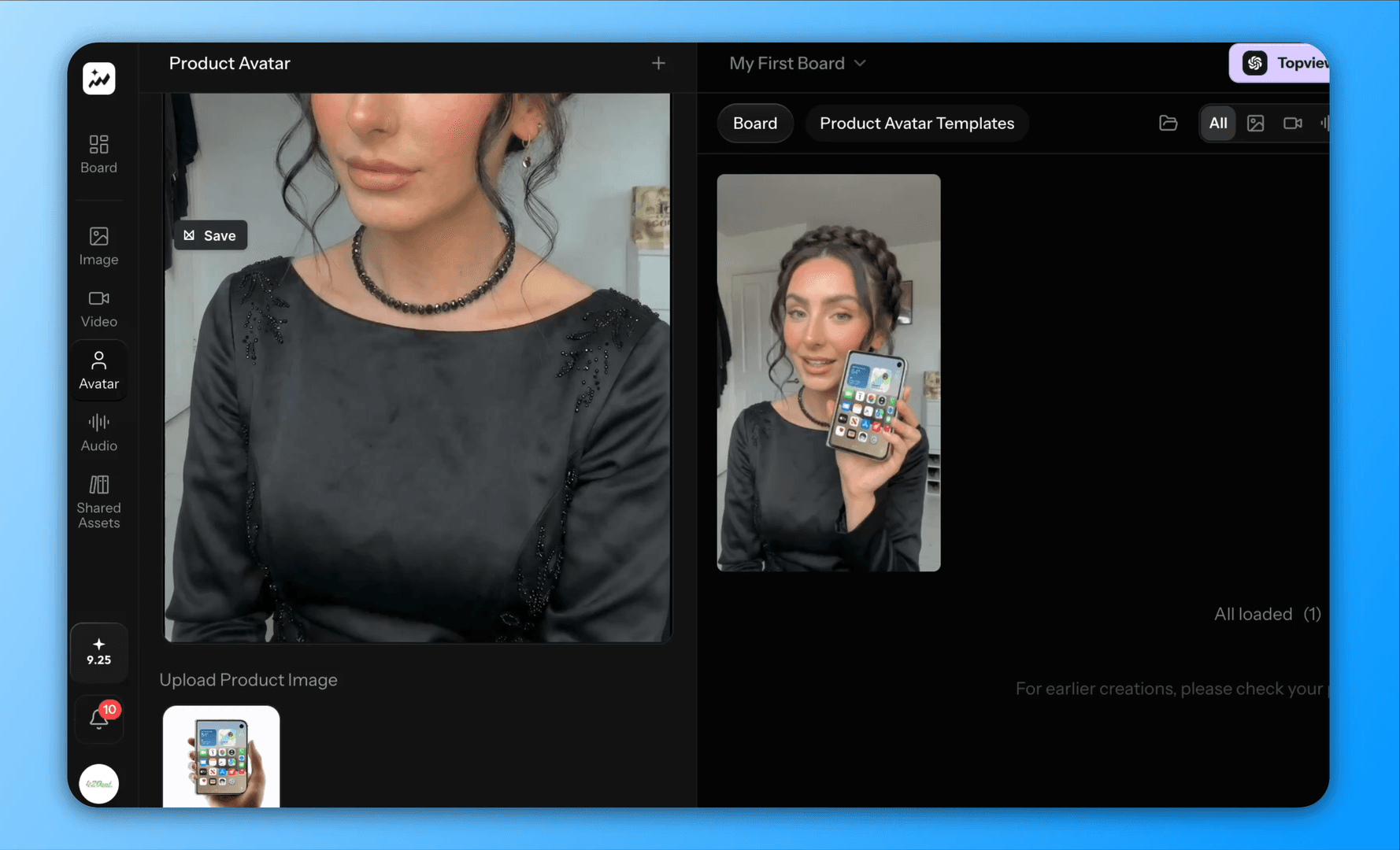
- Step 3 chooses the Avatar Action Mode, enters a script, picks a voice and generates.
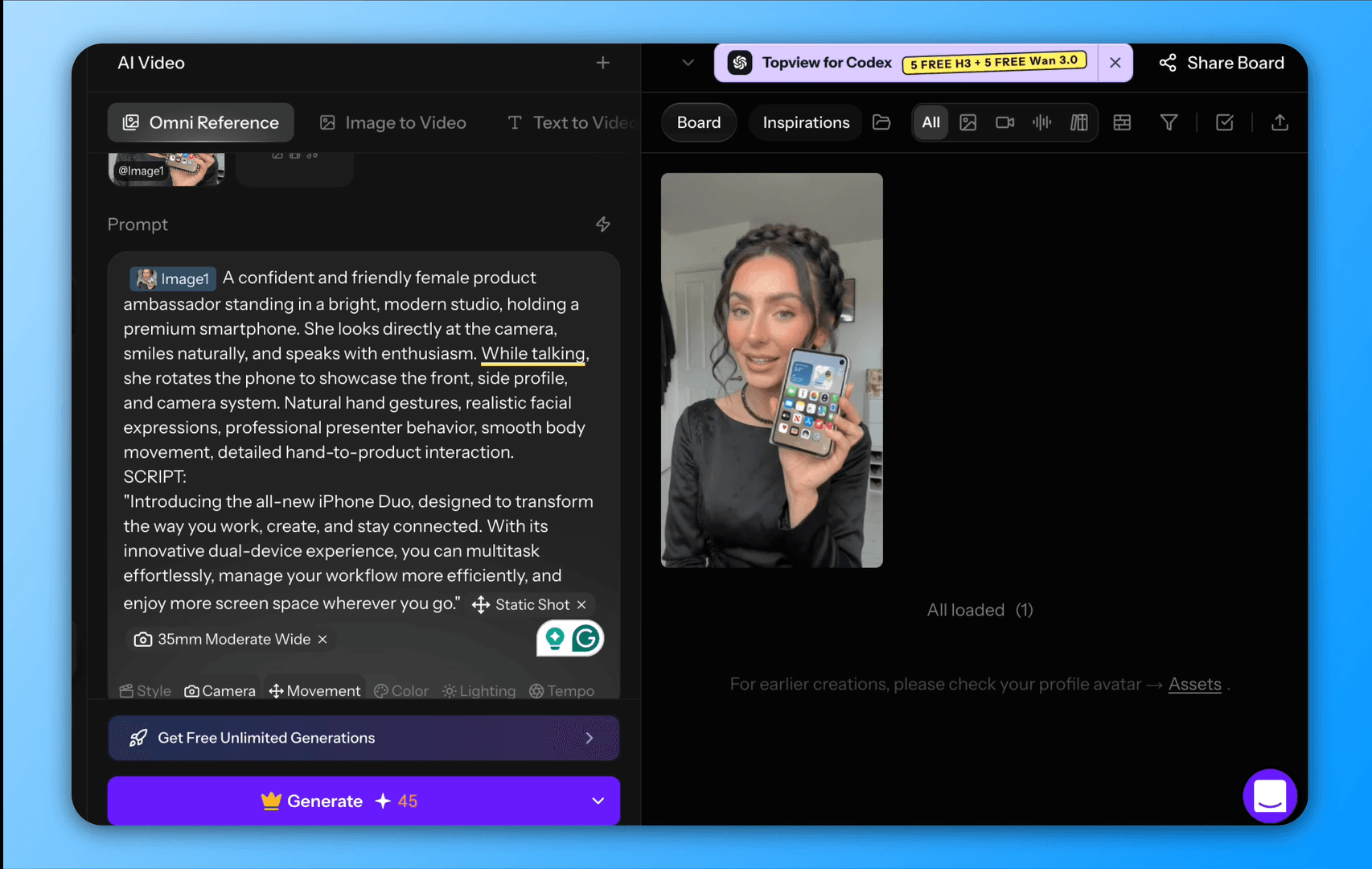
Generation starts from a template, and templates carry categories; a crown icon marks a paid template. Templates lead to the placement choice in step 2, which the next table sets side by side.
What Does Auto Mode Do Compared With Manual Mode?
Auto Mode places the product for you, while Manual Mode lets you adjust its size and placement before generating. A mode here means a way to place the product, per the guide.
| Mode | What you do | When it fits |
|---|---|---|
| Auto Mode | Upload the image and generate | A standard product |
| Manual Mode | Adjust size and placement, then generate | A product whose placement looks off |
Please note that the brush placement may take a few trials and errors before achieving the ideal result. After product placement, we would use that image as the start frame of the video, which leads us to the next stage.
What Does the Talking-Video Step Add?
The avatar action step turns the still image into a talking video of up to 120 seconds in Standard mode. A cheaper Fast mode also exists. Both use Avatar 4.
Avatar 4 takes its voice from a public library or a cloned voice. The library filters by language, gender, and age. Text-to-audio and imported audio both work. Add Pause and Modify Pronunciation to fine-tune the audio.
Audio aside, a motion prompt guides the avatar. My advice is to keep it broad. Its example is "the woman in the picture is introducing the products in her hand". Overly detailed prompts look forced. The seconds of video set the cost, and the next section prices them.
What Does a Product Avatar Video Cost in Credits?
A Product Avatar video costs 1 credit for two images plus 0.10 credits a second of Avatar 4. Fast costs 0.06 credits per second, so the charge lands twice: on the image and the video. The figures come from the credit guide and the AI Avatar guide. A credit is TopView's unit of spend.
| Step | Credits | Source |
|---|---|---|
| Image generation | 1 for two images | Credit guide |
| Avatar 4, a second | 0.10 | AI Avatar guide |
| Avatar 4 Fast, a second | 0.06 | AI Avatar guide |
| Avatar 4 Off-Peak, a second | 50% off the normal rate, Business only | AI Avatar guide |
| Free-account watermarked image | 0.5 | Promer's test |
The credits above include a 60% price cut, per the guide. Standard went from 0.25 to 0.10 credits a second, and Fast from 0.15 to 0.06. Off-Peak mode costs half the normal rate, on Business only, and delivers within 24 hours.
Delivery aside, using a Free plan would cost you 1 credit without a watermark and 0.5 with it. Credits convert to dollars next.
What Does One Product Avatar Video Cost in Dollars?
A 30-second Standard Product Avatar video costs 4 credits, or $0.40 on Ultra to $0.72 on Plus. The prices were read on 2026-10-01.
| Video | Credits | Cost on Ultra | Cost on Plus |
|---|---|---|---|
| 30 seconds, Standard | 4 | $0.40 | $0.72 |
| 30 seconds, Fast | 2.8 | $0.28 | $0.50 |
| 60 seconds, Standard | 7 | $0.70 | $1.26 |
| 60 seconds, Fast | 4.6 | $0.46 | $0.83 |
The basis is the image credit plus the seconds times the rate. The cost per credit is $0.100 on Ultra and $0.180 on Plus, at promotional prices and with no retries. TopView publishes no cost per credit, so each figure is derived. TopView AI Pricing lists every plan. The TopView AI plan that fits depends on the video count.
Cost is half the question, and the other half is whether the video is usable.
Where Does the TopView AI Product Avatar Fit Break?
The fit breaks on some product shapes and sizes, and hands distort. Fit here means how naturally the product sits in the avatar's hand. There are 2 problems.
Firstly, automatic placement works in most cases. Depending on the product's shape or size, the fit in the hand can look slightly off. When I ran a perfume bottle in Auto Mode. Its video showed distorted hands, while the script and the product were accurate.
Accuracy aside, other users report the same pattern. The fit looked slightly off for some shapes and sizes. TopView makes no claim about shapes. Shapes decide the outcome, so the product class matters next.
Which Products Fit the Avatar and Which Do Not?
Products a hand holds easily fit the template library, and awkward shapes and sizes break it. A product class means a group of products with a similar shape. The four items below run from what works to what to do. The last leads to the levers in the next section.
- Covered: pets, beverages, watches, lifestyle items, handbags, and beauty products.
- Looks off: odd shapes and sizes, such as deformed products, exaggerated proportions
- Not shown: packaging fine print such as Ingredients list, warnings, and safety text
- Recommended: test the product image in Manual Mode before paying for the full video.
A failed test costs one generation, which is 1 credit for two images, so testing first is cheap. Cheap tests still need a method, and the vendor's own levers come next.
How Do You Improve the Product Avatar Fit?
There are three levers: Manual Mode, a broad motion prompt and a single clear product image. Manual Mode sets the product's size and placement. A broad prompt looks more natural than a detailed one. One product image is the input.
Advice aside, Product Avatar is one of several avatar tools, and the last main section separates them.
How Does Product Avatar Differ From the Other TopView AI Avatar Tools?
Product Avatar adds a product to an avatar. An avatar tool is a feature that makes or animates an AI presenter, per the guide. The tools split as follows:
- Product Avatar adds a product to an avatar.
- Avatar 4 makes the avatar talk.
- Design My Avatar creates the avatar itself.
- Video Lip-Sync adds a voice to an uploaded video.
Product Avatar then uses Avatar 4 for its video step. A whole ad from a product link needs the TopView AI Video Agent. The Video Agent recreates a reference video for a product. The Video Agent suits version and length choices, and Product Avatar suits a single presenter.
Both avatar steps queue, and how long a run takes differs between reports.
How Long Does a Product Avatar Run Take?
A Product Avatar run takes a minute or two in my testing. That was an Ultra plan test on 10 October 2026. However, the waits on unlimited-credit jobs reach hours.
Hours matter on Business: Off-Peak mode promises delivery within 24 hours. Neither the TopView official guide nor the pricing page states a time for a run. Do not plan launch-day creative on an estimate.
The queue rules differ by plan, and the TopView AI review covers them: Unlimited runs in the standard queue. Short buyer questions come next.
What Else Do Buyers Ask About TopView AI Product Avatar?
Three short questions remain: free use, your own photo and Off-Peak mode.
Is TopView AI Product Avatar Free?
No, the pricing page shows no free card, but there will be 10 free credits, which you can spend for a 1-video Avatar 4 Fast trial. When using the Free plan, my test made watermarked images for 0.5 credit. Free credits lead into the paid ladder, which TopView AI Pricing covers.
Can You Use Your Own Photo As the Avatar?
Yes, Topview offers "Use My Photo" for the avatar. Design My Avatar builds one from a photo with the face kept fixed. Design My Avatar changes the hairstyle, clothing and background. Step 1 starts from Use My Photo, and the Off-Peak question follows.
Which Plan Includes Off-Peak Mode for Avatar Videos?
Off-Peak mode is Business-exclusive. It cuts the second of the two credit charges, the video charge, per the AI Avatar guide. Whether it suits launch work is the last question.
Does Off-Peak Mode Suit Launch Work?
No, a delivery within 24 hours suits batch work and not launch-day creative. The saving is 50% against a day's wait, and no source states a faster guarantee.
Conclusion
The TopView AI Product Avatar puts one product image in a presenter's hands. A 30-second video costs about $0.40 to $0.72. The fit breaks on some shapes and sizes. See the plans at TopView AI.
We may earn a commission when you buy through links on this page. It never changes what we recommend, and the price you pay is the same either way. How we make money
(keep reading)
TopView AI Legitimacy: Reviews, What Users Report and Safety
TopView AI Alternatives: Compared by Price, Output and Fit
TopView AI Review: Output Quality, Limits and Pricing
Get the AI tool roundup.
One email a week: what launched, what is actually worth paying for, and what to cancel. No hype, no spam.
Unsubscribe any time. We never sell your email.