Luma AI Review
Luma quietly stopped being the tool most search results still describe. One of the four reviews I found is reviewing the version that no longer exists.
We may earn a commission when you buy through links on this page. It never changes what we recommend, and the price you pay is the same either way. How we make money
Luma AI is worth it for teams that want one agent-driven workspace across many video, image and audio models. Not for anyone looking for the cheapest raw clips or the single best video model, both of which are available more directly elsewhere.
Is Luma AI Worth It?
Luma AI is worth it for teams that want one agent-driven workspace across many video, image and audio models. Not for anyone looking for the cheapest raw clips or the single best video model, both of which are available more directly elsewhere. In my testing that positioning holds. Three of the four reviews I found agree on the same shape; the fourth doesn't disagree, it's reviewing a version of Luma that predates this positioning entirely.
Luma pivoted from a standalone prompt-to-video generator into what its own site now calls "creative agents for creative professionals" sometime in 2026. That change is the actual subject of this review, more than any single feature or score.
The Dream Machine You're Picturing Doesn't Exist Anymore
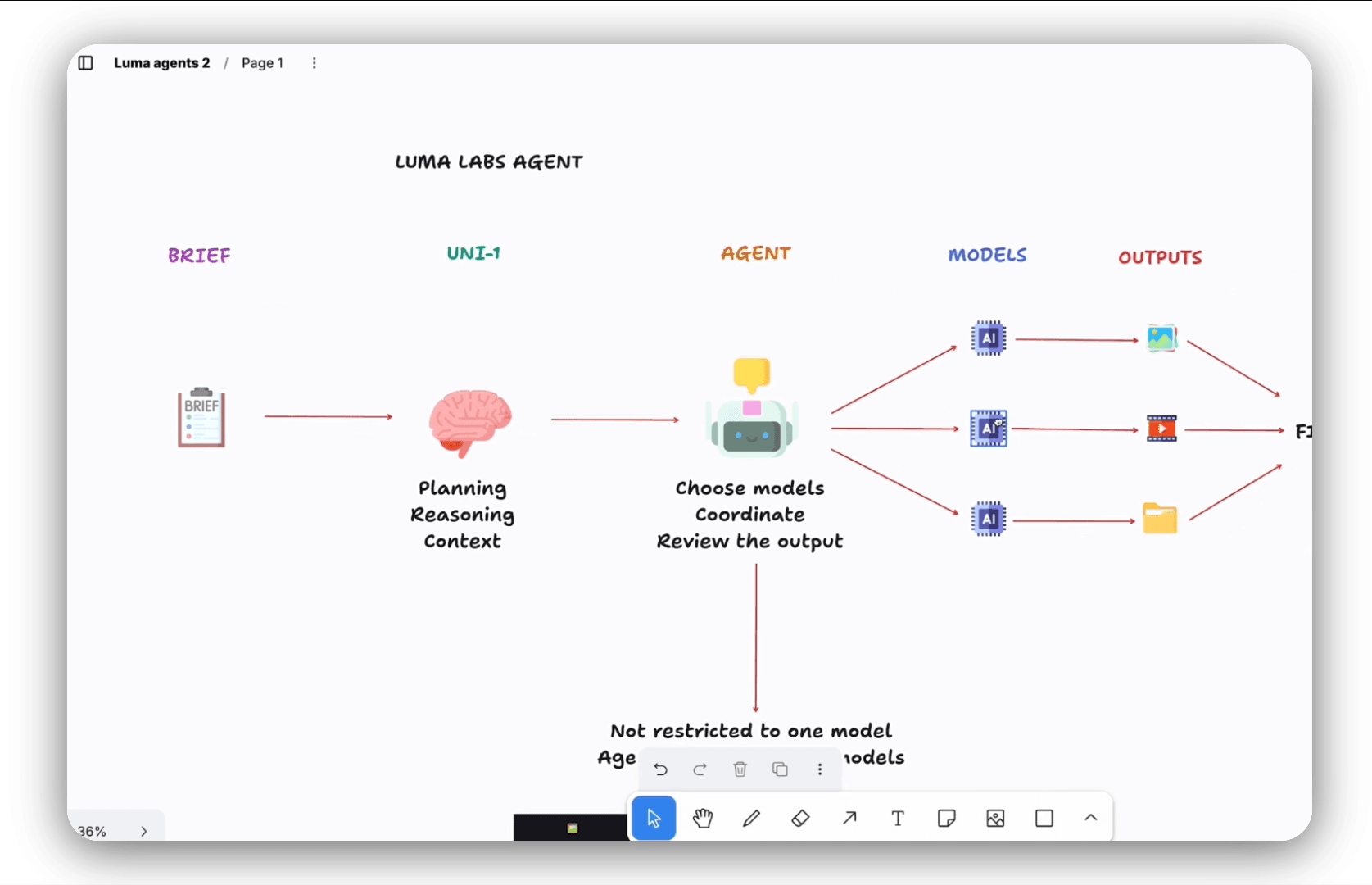
Search results for "Luma AI review" still mostly describe Dream Machine: type a prompt, get a short clip, done. That tool existed, and Pollo AI's review, the earliest of the four, from March 2026, documents it accurately: a standalone generator producing 4-to-6-second clips from text or images, with a standing free plan and no mention of "agents" anywhere.
Sometime after that, Luma rebuilt itself around an agent. I signed in and found the interface asks what you want to create, then a named AI agent plans the job, picks a model, and starts generating on a shared canvas. aialleyway's own account of the change puts it plainly: "What was Luma Dream Machine, a clean text-to-video generator, is now Luma AI Creative Agents." The live site's own title tag agrees: "Creative agents for creative professionals," not Dream Machine.
What Luma AI Is Actually Good At
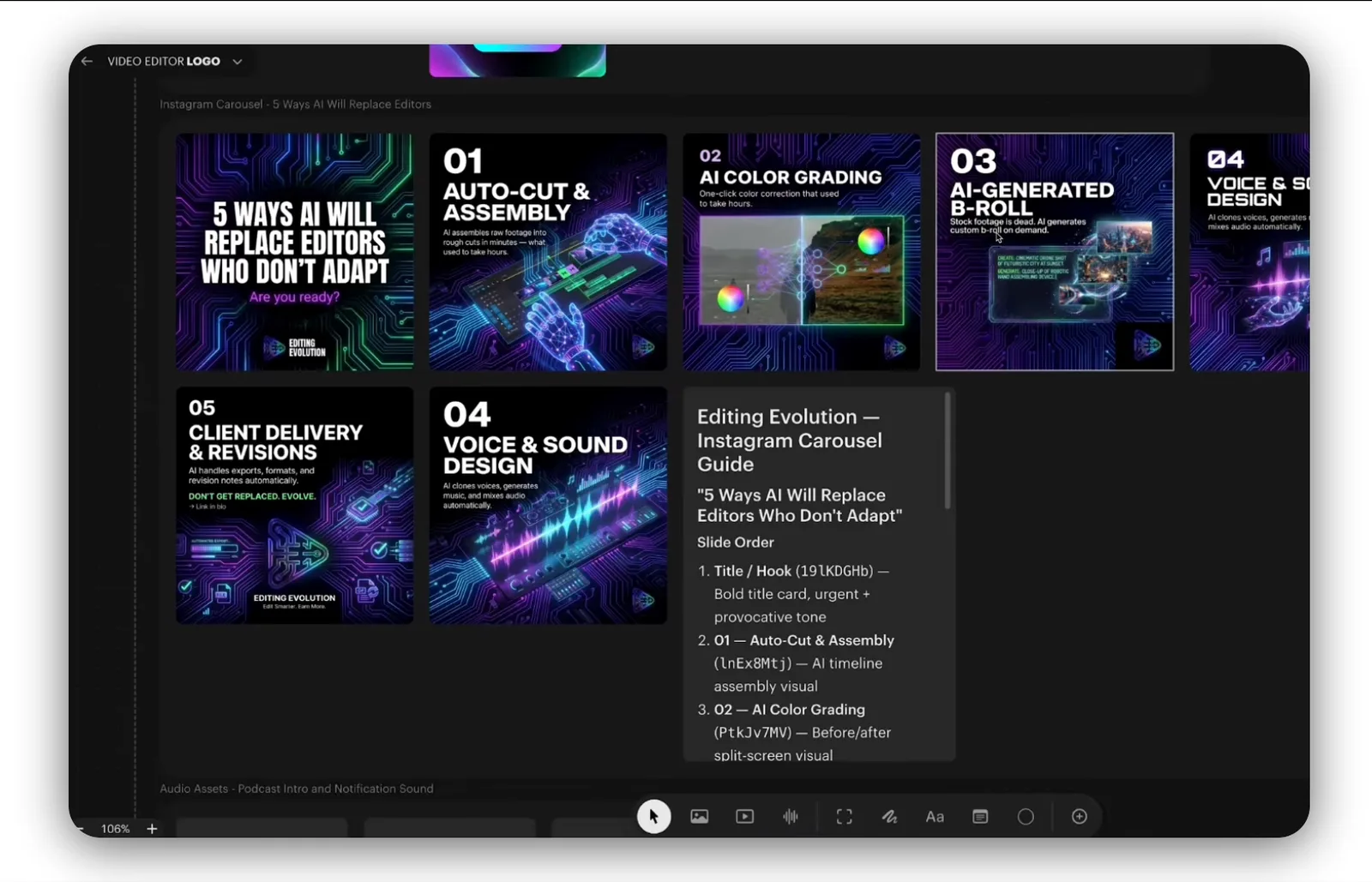
The model roster is the standout, and it's wide. It has its own Ray 3.14 and Ray 3.2 alongside third-party access to Google Veo 3/3.1, Kling, Seedream, GPT Image, and ElevenLabs' music, sound-effect and voice models, all reachable from one plan and one credit pool. Update in 2026, it now also lists Uni-1, Nano Banana Pro, Kling Omni and Seedance 2.0.
The agent itself drafts fast and talks back.
My tested prompt
came back as a ready to use five-second clip in a couple of minutes, rendered on Ray 3.2.
In-place model fallback is the most useful feature. When Luma's own Ray model returned a lifeless result in my test, re-routing the same scene to Veo 3, without leaving the board, got back a clip with real motion and native audio. A single-model tool can't do that.
Where It Breaks: the Resolution That Wasn't
The clearest documented failure is specific, not a vague "results vary" complaint. I asked the agent to upgrade the clip to "a longer, 1080p final." The agent replied "10 seconds at 1080p, same scene," and delivered a near-static clip that measured 720p, with the character moving across the full ten seconds. Re-running the same scene through Veo 3 fixed the motion outright, but that clip also came back at 720p despite identical billing.
Two structural limits compound this. Every generation caps at 5 seconds per model call. Motion can be extended within that window, but Luma doesn't natively produce the 10-to-30-second continuous shots that Runway, Kling or Veo can. And Luma's own Ray model outputs silent video; native audio only appears when a prompt is routed to a third-party model like Veo or ElevenLabs instead.
Credit costs are also opaque before you generate. My five-second draft turned out to cost about 97 credits, learned only by watching the balance drop. The plans are sold in bulk credit pools, but nothing on screen shows the cost of a specific generation in advance.
Luma AI Pricing, Verified
Confirmed it directly against Luma's own site on 2026-09-02:
| Plan | Monthly | Billed yearly | Credits |
|---|---|---|---|
| Plus | $30/mo | $25/mo | 10,000 |
| Pro | $90/mo | $75/mo | 40,000 |
| Ultra | $300/mo | $250/mo | 150,000 |
| Team / Enterprise | Custom | Custom | Custom |
Before committing to a paid plan, worth to acknowledge that on individual plans, your inputs can be used to improve Luma's models, and opting out is reserved for Enterprise accounts.
Luma vs Veo, Kling and Runway
My comparison is direct about what to use instead if Luma's breadth isn't the point. For the single best cinematic video model, Google Veo is the pick (see Google Veo 3 Review) at a lower price than Luma's platform if video is the only job. For the cheapest top-tier clips, Kling and Seedance both undercut Luma's per-clip cost when accessed directly; see Kling AI Review. Runway is the closest structural comparison, another multi-model aggregator with its own editing suite; see Runway Review for the full comparison. For animation-first work at a similar price point, see Pika AI Review.
The trade-off is consistent: Luma is convenient because it puts many models behind one login and one bill. It isn't the cheapest or the single best at any one of them.
Who Luma Is Not For
- Anyone who wants the cheapest raw clips or the single best video model specifically
- Projects needing native audio without routing through a third-party model
- Clips longer than 5 seconds in a single generation
- Casual, occasional use, since there's no standing free tier to fall back on between projects
- Anyone who wants to see a generation's exact credit cost before running it
Where This Fits in the Wider AI Video Toolkit
This review sits inside the AI Video Tools section. For the single best cinematic model Luma can route to, see Google Veo 3 Review; for the cheapest top-tier clips, see Kling AI Review. For a wider comparison across the category, see The Best AI Video Generators, Compared.
Frequently asked questions
Is Luma AI any good?
Yes, for its current job: an agent-driven workspace spanning many models, based on my testing and three of the four reviews I found. That's a different question from whether the old standalone Dream Machine was good. That product no longer exists in the same form.
Is Luma AI free?
No standing free plan is shown on the current pricing page. I confirmed that directly on 2026-09-02. Paid plans start at $30/mo (Plus, billed monthly) or $25/mo billed yearly. A limited legacy free tier reportedly still exists for older accounts, per one source, but isn't offered to new signups.
Is Luma trustworthy?
I didn't find any security concerns in my testing or in the reviews I checked. The one real caution is data use, not safety: individual-plan inputs can train Luma's models, and opting out requires an Enterprise plan.
Is Luminar AI good?
Different product. Luminar AI is a photo-editing tool, unrelated to Luma AI's video generator. Not covered by this review.
Ready to try Luma?
We may earn a commission when you buy through links on this page. It never changes what we recommend, and the price you pay is the same either way. How we make money
(keep reading)
Blort AI Review: Research Quality, Credits and Pricing
TopView AI Legitimacy: Reviews, What Users Report and Safety
TopView AI Alternatives: Compared by Price, Output and Fit
Get the AI tool roundup.
One email a week: what launched, what is actually worth paying for, and what to cancel. No hype, no spam.
Unsubscribe any time. We never sell your email.