Runway Review
After testing Runway on the same benchmark this site uses for Veo and Kling, I found Gen-4 scored 4.3/10 while Gen-4.5 scored 6.2/10.
We may earn a commission when you buy through links on this page. It never changes what we recommend, and the price you pay is the same either way. How we make money
Runway is worth it for directors, VFX artists and 3D generalists who need precise technical control and pipeline integration. It's a harder sell for high-volume, budget-conscious short-form content, where its speed and cost work against it.
Is Runway Worth It?
Runway is worth it for directors, VFX artists and 3D generalists who need precise technical control and pipeline integration. It's a harder sell for high-volume, budget-conscious short-form content, where its speed and cost work against it. In my testing, it plays less like a single text-to-video generator and more like a creative suite built around controllable generation: camera movement, character consistency, and a chat-based VFX editing tool called Aleph.
The most rigorous benchmark I check for this site, already used on the Veo and Kling reviews, scores Runway in a way that needs a caveat: its detailed review covers a model version its own data shows has already been superseded. More on that below.
What Runway Is Actually Good At
Camera data export is the standout, and it's a feature I haven't seen mentioned anywhere else. When Runway's Gen-4.5 model generates a clip, the virtual camera move behind that shot can be exported as a JSON or FBX file. Imported into Blender, Cinema 4D, or After Effects, that data lets a 3D scene's camera move in sync with the AI-generated footage, so 3D text, motion graphics, or character models can be composited directly into it. For anyone bridging AI generation with a 3D or compositing pipeline, that's a distinctive capability.
Consistent Character tools are the second real strength. Uploading a reference image lets later generations maintain that character's facial structure, hair, and clothing across new scenes and angles. Paired with Act-One, which transfers performance and motion from a source video onto the generated character, prompting starts to feel closer to directing.
Model access has broadened significantly. I confirmed directly against the live pricing page that Runway now sells direct access to third-party models (Kling 3.0, Seedance 2.0, Nano Banana Pro) alongside its own Gen-4.5, putting several leading models behind one plan.
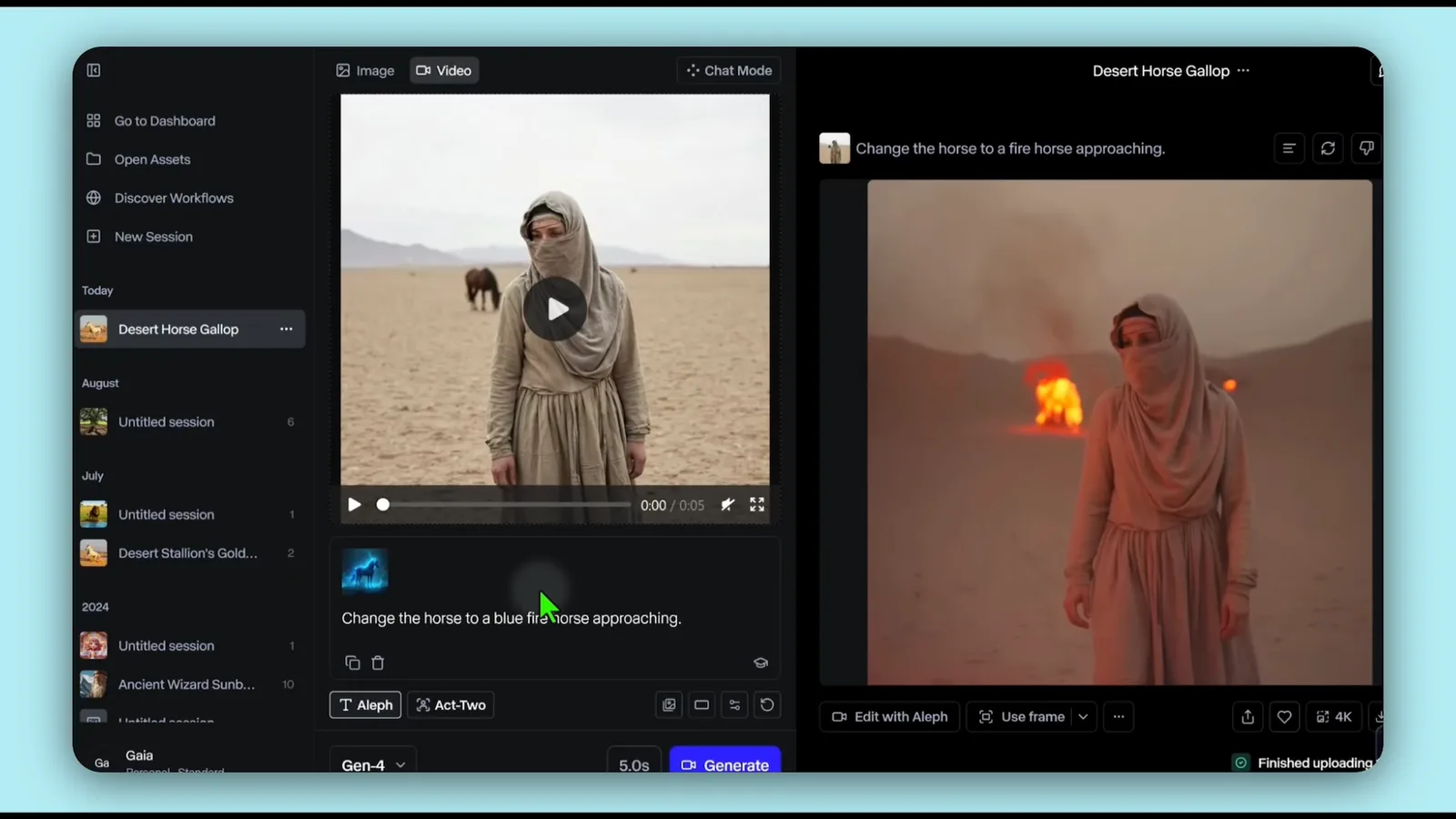
Aleph, the platform's chat-based VFX tool, lets me alter colors, lighting, and specific video elements through text prompts rather than traditional compositing software. I confirmed it live as "Aleph 2.0," priced at roughly double Gen-4.5's per-second credit cost, reflecting its heavier processing. See How to Make a Film with AI for where Aleph fits into a full filmmaking workflow rather than as an isolated feature.
Where It Breaks: the Credit Trap and Inconsistent Detail
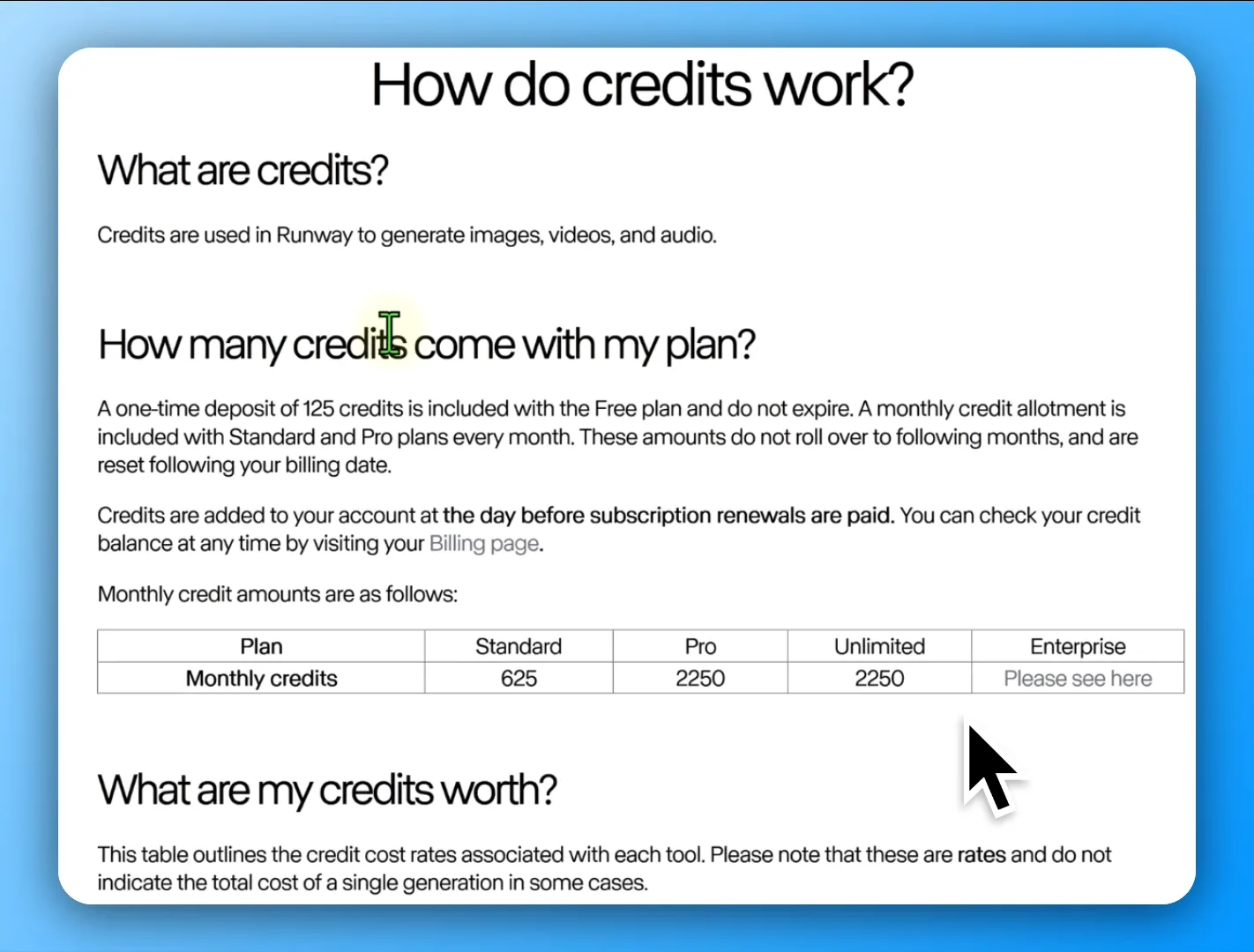
In my testing, the credit system is the most concrete pain point. A 10-second clip costs 100 credits. Two more attempts to get the prompt right cost 200 more. Extending the accepted version to 20 seconds costs another 100, and upscaling to 4K adds 40 more: a single finished 20-second clip ran 440 credits, nearly the entire monthly allowance on the cheapest paid plan. Credits get deducted immediately, even for outputs I discarded.
Detail and motion consistency were the sharpest problems I ran into, though that was on the older Gen-4 model: hands rendered as indistinct blobs rather than fingers, facial detail held for roughly the first two seconds before degrading, and clips defaulted to slow motion even when I hadn't asked for it. Group scenes and fast action were where quality broke down fastest.
One structural limitation holds regardless of model version: Runway generates no native alpha channel. Elements like smoke, fire, or a character meant to be composited over other footage need Runway's separate background-removal tool or external rotoscoping, an extra step competitors with native transparency support don't require.
The Benchmark Score That's Already One Version Behind
I checked this against the same structured five-category benchmark this site already uses and trusts on its Veo, Kling and Pika reviews. Its main review scores Runway Gen-4 at 4.3/10 overall (Prompt Adherence 5.6, Temporal Consistency 4.1, Visual Fidelity 4.4, Motion Quality 4.0, Style and Cinematic Realism 3.3), a weak result next to competitors like Kling 3.0 (8.1/10) or Seedance 2.0 (8.4/10) on the same scale.
That same article's own comparison table, elsewhere on the page, lists a different entry: Runway Gen 4.5, scoring 6.2/10 overall, higher on every single category than the 4.3/10 the detailed review covers. I confirmed directly against Runway's live pricing page that Gen-4.5 is the current flagship model across every tier; there's no plain "Gen-4" option left to select. The complaints above, the blob-like hands, the slow-motion default, the style-realism gap, trace back to the version that's no longer what a new subscriber gets.
This isn't a sourcing error. It's the same benchmark, the same methodology, and a real measured improvement between two versions of the same tool, sitting inside one article. I haven't found a benchmark that scores Gen-4.5 with the same category-by-category rigor Gen-4 received, so I'm treating 6.2/10 as the more current data point without assuming it fully resolves every complaint above.
Runway Pricing, Verified
I confirmed this directly against Runway's own site, 2026-09-02:
| Plan | Monthly | Billed yearly | Credits/mo |
|---|---|---|---|
| Free | $0 | — | 125 (one-time) |
| Standard | $15/mo | $12/mo | 625 |
| Pro | $35/mo | $28/mo | 2,250 |
| Max | $95/mo | $76/mo | 9,500 |
| Enterprise | Custom | Custom | Custom |
An older pricing breakdown I checked, dated November 2025, gives dollar figures and credit counts that match the live site exactly on every tier, a case where age didn't cost accuracy on price, even though that same source's featured model (Gen-3 Alpha) has since been superseded twice over.
What changed is the top tier's shape, not its price. That November 2025 breakdown describes the $76/$95 tier as "Unlimited," uncapped generation, with a caveat that heavy users get pushed into a slower queue after a threshold. The live site shows the same price point renamed Max, now with a stated, finite allowance of 9,500 credits a month rather than unlimited generation. That's a real product change, not a stale number: the tier still costs the same, but it no longer promises to be uncapped.
Runway vs Kling and Other Alternatives
The clearest alternative I'd point to is Kling, which wins on tighter prompt adherence and lower cost for high-volume, budget-conscious use. This site's own Kling AI Review covers it directly, including its own tradeoffs on render time and cost.
Beyond Kling, the split by job holds up: Alibaba's Wan Alpha is the stronger choice specifically when native transparent-background output matters for compositing, and Seedance handles multi-shot, continuous narrative generation in a single prompt, a job Runway's per-clip, stitch-it-yourself approach doesn't attempt to solve directly.
Who Runway Is Not For
Based on my testing, Runway isn't the right fit for:
- High-frequency, budget-conscious short-form content: TikTok, Reels, daily social posting
- Teams needing fast iteration over a small number of highly controlled shots
- Anyone who needs perfect prompt-to-output predictability without repeated regeneration
- Projects requiring native alpha-channel/transparent output without an extra compositing step
- Business use cases needing guaranteed, budget-predictable ROI rather than iterative creative experimentation
Where This Fits in the Wider AI Video Toolkit
This review sits inside the AI Video Tools section. For the budget-focused, high-volume alternative to Runway, see Kling AI Review. For a wider comparison across the category, see The Best AI Video Generators, Compared.
Frequently asked questions
Is Runway AI actually good?
For technical, control-focused work (camera export, character consistency, VFX editing via Aleph), yes, based on my testing. For raw output quality specifically, the benchmark I trust most for this scores it well behind competitors like Kling and Seedance, though that score is for an older model version the live site no longer offers.
Is Runway AI safe to use?
I didn't run into any security concerns during testing. Copyright is an open question, not a safety one: Runway's own terms grant users rights to what they generate, but questions about the training data behind the model remain unresolved.
Which AI is better than Runway?
Depends on the job. Kling wins on tighter prompt adherence and lower cost at volume; see Kling AI Review. For native transparent-background output, Alibaba's Wan Alpha is the stronger specialist tool.
Is Runway AI free to use?
Yes, with real limits: a one-time deposit of 125 credits that doesn't expire, confirmed directly on the live pricing page. Paid plans start at $12/mo (Standard, billed yearly) or $15/mo billed monthly.
Ready to try Runway?
We may earn a commission when you buy through links on this page. It never changes what we recommend, and the price you pay is the same either way. How we make money
(keep reading)
Blort AI Review: Research Quality, Credits and Pricing
TopView AI Legitimacy: Reviews, What Users Report and Safety
TopView AI Alternatives: Compared by Price, Output and Fit
Get the AI tool roundup.
One email a week: what launched, what is actually worth paying for, and what to cancel. No hype, no spam.
Unsubscribe any time. We never sell your email.