Stable Diffusion Review
After testing Stable Diffusion, I checked DreamStudio, the pricing page older coverage still points to, and found it no longer loads.
We may earn a commission when you buy through links on this page. It never changes what we recommend, and the price you pay is the same either way. How we make money
Local, open-source image generation is still worth it. "Stable Diffusion" by name is a less certain answer within that category than most 2026 coverage suggests.
Is Stable Diffusion Still Worth It?
Local, open-source image generation is still worth it. "Stable Diffusion" by name is a less certain answer within that category than most 2026 coverage suggests. In my testing, the core appeal holds up: no recurring fees once self-hosted, full control over the model and your data, and no risk of a provider quietly retiring a version you've built a workflow around. What's less settled is whether Stable Diffusion specifically remains the sharpest tool for that job, or whether it's become the open-source category's own legacy option. This review covers both questions directly, starting with a product change most coverage hasn't caught up to.
What Stable Diffusion Actually Does Well
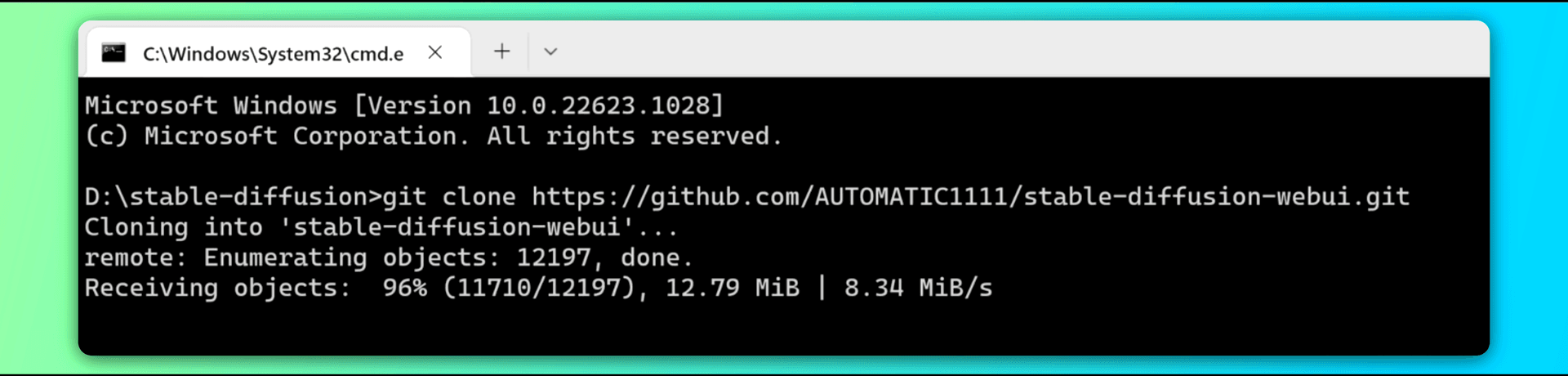
In my testing, Stable Diffusion's open-source foundation means anyone can download it, run it locally on their own GPU, and modify or fine-tune it freely, a different value proposition from closed, subscription-only tools. Advanced editing tools (inpainting to fix or replace parts of an image, outpainting to extend it, ControlNet for precise pose and composition control) turn it into something closer to a professional editing suite than a simple prompt box. Run locally with adequate hardware, I found no per-image cost and no internet connection required, a real advantage for cost-conscious, high-volume, or privacy-sensitive use. See our Free AI Image Generators roundup for how this self-hosted route stacks up against hosted free tiers.
DreamStudio Is Gone: Here's What Replaced It
One review I checked, published in 2026, directs readers to DreamStudio for pay-as-you-go pricing. I checked live, 2026-09-02: dreamstudio.ai fails to load entirely. Stability AI's own current site doesn't feature it as an active product. Instead, it promotes Stable Assistant as its web-based creative platform, powered by Stable Image Ultra, a workflow built on top of Stable Diffusion 3.5 Large rather than raw SD 3.5 alone. "Dream Studio" survives only as a legacy category label in a contact-form dropdown on Stability AI's site. If you're pricing Stable Diffusion based on older coverage that points you to DreamStudio, that path no longer exists as described. Stable Assistant is where Stability AI now directs consumer traffic.
Is Stable Diffusion Itself Still the Right Open-Source Pick?
I found this question more layered than a straight yes or no. A live r/StableDiffusion community thread from around June 2026 includes a direct, unambiguous reply to exactly this question: "Stable diffusion? No, it is a very outdated model by now," naming several newer open-weight local models (Flux Klein, Z-Image, Qwen, Chroma, Anima) as "much more capable" replacements within the same local, self-hosted lane. Other commenters in the same thread still defend local generation broadly: full control, no forced model deprecation the way hosted providers can retire a version overnight, genuine privacy, and no ongoing subscription cost. Local and open-source generation clearly remains worth it. The real debate in the community that uses this technology daily is whether Stable Diffusion specifically is still the best model to run within that category, or whether it's been passed by its own successors.
Where It Still Struggles
Text rendering remains a genuine weak point: fonts often come out wobbly or misspelled even when I specify the exact wording, a real limitation for posters, memes, or anything with legible lettering. Hands, faces, and fine detail can still come out distorted, especially under complex or highly specific prompts, though this has measurably improved version over version in my testing. Beginners face a real setup and interface learning curve, whether installing locally or navigating the wider ecosystem of web UIs and community tools. It isn't a one-click experience the way closed competitors can be.
The Real Risks Worth Knowing About
This deserves a direct, sober mention rather than a footnote: Stable Diffusion's open weights mean anyone can strip out safety filters, and there have been confirmed reports of the technology being misused to generate illegal, abusive material using customized or rolled-back versions of the model. Its training data has also been the subject of real copyright lawsuits against Stability AI, and open training data can reproduce and amplify bias present in that data. None of this makes the tool itself illegitimate. Millions of legitimate creative, commercial, and research uses exist, but it's a real part of evaluating an open-source model that anyone can modify, and worth knowing before adopting it for business use.
Local vs. Hosted: The Real Cost Math
I found one concrete data point worth citing directly, rather than a vague "it's cheaper" claim: a Reddit user's breakdown puts Nano Banana Pro API pricing at roughly $140 per 1,000 images at 1K/2K resolution, versus roughly $5 per 1,000 images generating locally with a newer open-weight model. That's a specific economics comparison none of the written reviews I checked provide with real numbers, and it illustrates why the "no recurring fees" pitch for local generation isn't just marketing language for anyone doing high-volume work.
Who Should Use Stable Diffusion / Who Shouldn't
For:
- Anyone who wants full local control, privacy, and no ongoing subscription cost, and has (or is willing to learn) the technical setup
- High-volume users where per-image API costs would add up fast
- Developers and researchers who want to fine-tune, customize, or build on an open model directly
Not for:
- Beginners who want a one-click, no-setup experience: the ecosystem still has a real learning curve
- Anyone needing reliable, legible text inside generated images
- Users who want the current state-of-the-art specifically: in my research, newer open-weight models may now outperform Stable Diffusion itself within its own category
Where This Fits in the Wider AI Image Toolkit
Stable Diffusion sits in the AI Image Tools section. For a hosted, credit-based alternative that doesn't require local setup, this site's own NightCafe review confirms the "affordable, credit-based, web UI" positioning used to describe it earlier in this review. And if you're comparing against DALL-E 3 as an alternative: this site's DALL·E 3 review already confirmed it was fully retired in May 2026, the third time this specific dead recommendation has surfaced across these reviews.
Frequently asked questions
How much does Stable Diffusion cost to use?
Running it locally with your own GPU is free after the hardware cost. Hosted access varies by provider. DreamStudio, which some older coverage still cites for pay-as-you-go pricing, no longer functions. Stability AI's current consumer platform is Stable Assistant, and I couldn't confirm its exact current pricing live, so I've flagged that for follow-up.
What is Stable Diffusion good for?
Creative art and illustration, marketing and social visuals, game concept art, and photo editing via inpainting/outpainting: anywhere full local control, customization, or cost at high volume matters more than one-click convenience.
Which Stable Diffusion is the best?
As of this review, SD 3.5 (specifically the Large variant, now wrapped into Stability AI's Stable Image Ultra workflow) is the current flagship. But based on what daily users are saying, newer open-weight local models outside the Stable Diffusion lineage entirely (Flux, Z-Image, Qwen, Chroma) are increasingly considered the sharper pick for anyone choosing purely on current capability.
Ready to try Stable Diffusion?
We may earn a commission when you buy through links on this page. It never changes what we recommend, and the price you pay is the same either way. How we make money
(keep reading)
Mobbin Review
Mobbin Alternatives
Aragon AI Review
Get the AI tool roundup.
One email a week: what launched, what is actually worth paying for, and what to cancel. No hype, no spam.
Unsubscribe any time. We never sell your email.