Voicemod Review
Voicemod is worth it as a real-time voice changer for Discord and streaming, not as an AI music tool. Its price varies because it publishes no fixed figure.
We may earn a commission when you buy through links on this page. It never changes what we recommend, and the price you pay is the same either way. How we make money
Yes, if you want a real-time voice changer and soundboard for Discord, gaming, or streaming: it's fast, beginner-friendly, and the free tier is enough to test it properly. No, if you're expecting an AI music generator, since Voicemod's music-adjacent feature is built for short memes, not finished songs.
Is Voicemod Worth It?
Yes, if you want a real-time voice changer and soundboard for Discord, gaming, or streaming: it's fast, beginner-friendly, and the free tier is enough to test it properly. No, if you're expecting an AI music generator, since Voicemod's music-adjacent feature is built for short memes, not finished songs. In my testing, it holds up as a strong live entertainment tool and a limited one for anything more serious. For the rest of my coverage in this space, see AI Audio & Music Tools.
Why Voicemod's Price Is Hard to Pin Down
Voicemod doesn't display one fixed public price on its main website. Checkout pricing varies by region, platform, and active promotions, so you need to check the price inside the app or at checkout rather than trusting a number from any review, including this one. One review cites Premium at $6.72/month, which I'd read as a snapshot from one region and moment, not a guarantee of what you'll see. If a listed price seems off from what you find at checkout, that's expected behavior for this product, not an error.
What Voicemod Actually Does Well
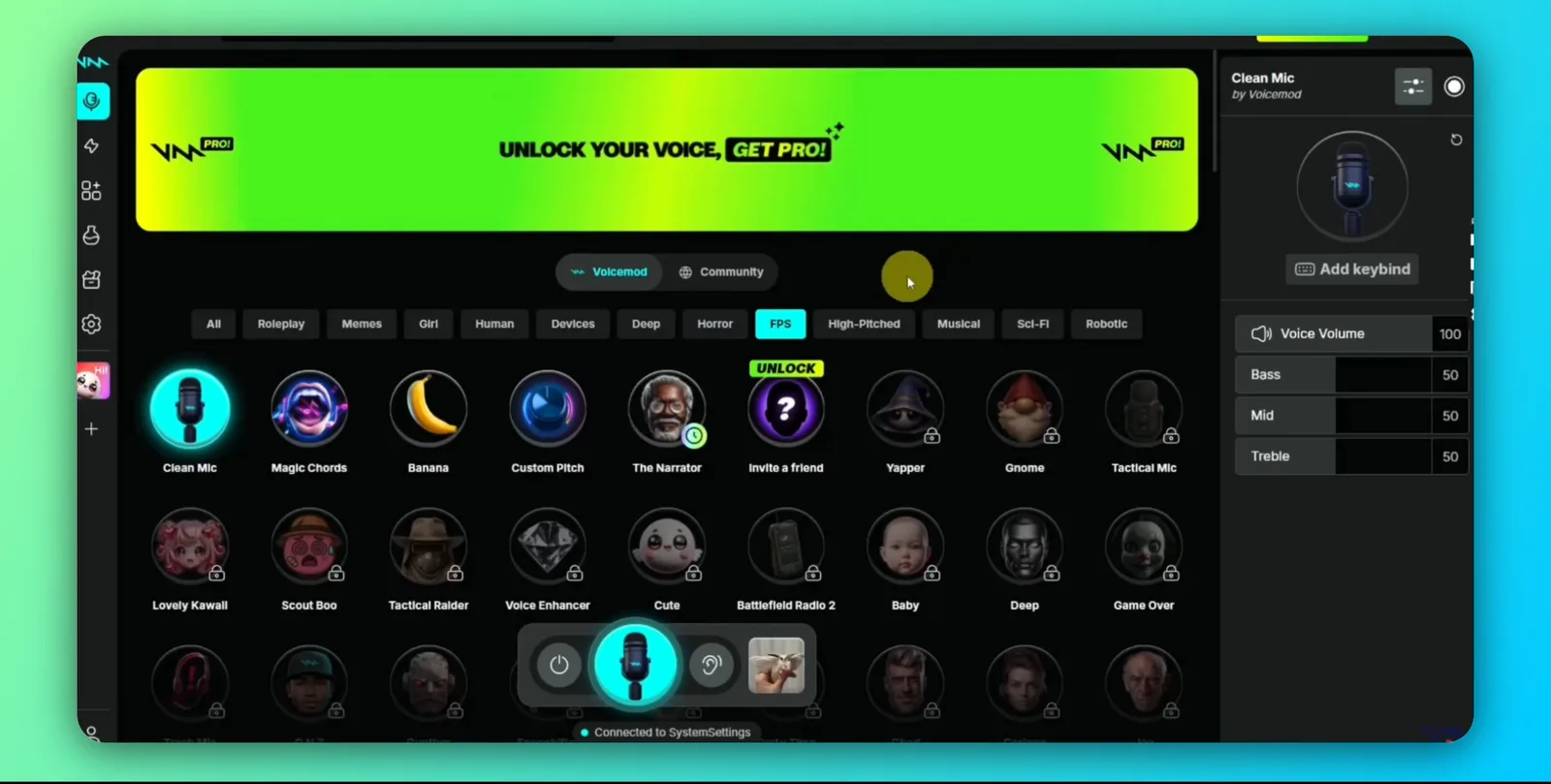
Voicemod's core strength is real-time performance: voice-changing effects apply instantly as you speak, with low enough latency to work smoothly during live gaming and streaming on Discord, Twitch, and OBS. The soundboard is useful beyond novelty. I used it to trigger reaction clips, transitions, and audio branding during a live session without manually editing anything afterward. Setup is simple: install the app, set Voicemod's virtual microphone as your input device, and it routes your processed voice into whatever app you're using. Even the free tier includes a sizable sound-effects library and a small, daily-rotating selection of voice filters, enough to properly evaluate the tool before paying anything. Discord is where most people actually use it. See my How to Do Voicemod on Discord walkthrough for the setup itself.
Voicemod Is Not an AI Music Generator
This causes real confusion, so it's worth stating clearly: Voicemod's Text to Song feature turns short lyrics into playful song snippets, but it offers no arrangement control, detailed mixing, full lyric development, or professional vocal production. In my testing it's a social-audio feature for meme-style clips, not a songwriting tool. If what you actually want is to turn an idea or lyrics into a complete, produced track, a dedicated AI music generator is the right category of tool. See my Suno review for what that looks like instead. Voicemod helps you sound different. It doesn't help you make music.
Is Voicemod Safe?
The official free or paid version of Voicemod is safe to use. The real risk is cracked or pirated copies circulating online, which frequently carry malware and can get your account banned if detected. There's no reason to use one given a usable free tier already exists. Beyond piracy risk, I didn't find any documented privacy concerns for Voicemod like some other AI audio tools have.
Where Voicemod Falls Short
The free tier's voice selection is limited in my testing: a small handful of options that rotate daily rather than a stable library you can rely on. Sound effects in the free tier can be triggered but not customized or modified. VoiceLab, the tool for creating fully custom voices, is Pro-only. Performance can also dip on lower-end systems, introducing latency or glitches during live use. Test it on your actual hardware before committing to a live session where that would matter. Some users also report setup friction around microphone routing and less-than-ideal support or refund experiences.

Voicemod Alternatives, By Actual Need
- Want something simpler and totally free? Clownfish offers basic effects (robot, alien, pitch shifts) with no soundboard or advanced customization, good if Voicemod feels like overkill.
- Need more professional-grade voice acting or background noise reduction? MorphVox is built for that specifically, aimed at voice actors and broadcasters.
- Want a wide preset library for recorded (not just live) content? Voxal covers both real-time and recorded voice change with a large effect library.
- Actually want to create music, not just change your voice? A dedicated AI music generator like Suno is the right tool. See my Suno review.
Who Voicemod Is For / Not For
For:
- Streamers and gamers on Discord, Twitch, or Kick who want real-time character voices and soundboard reactions
- Content creators making short-form comedy, roleplay, or meme content for YouTube, Instagram, or TikTok
- Casual voice actors and tabletop roleplayers wanting quick character voices without dedicated equipment
Not for:
- Anyone wanting to produce complete, finished songs, since Text to Song is a meme feature, not a music production tool
- Users on low-end hardware who need guaranteed low-latency performance
- Anyone expecting one fixed, universal price: confirm the actual checkout price for your region before assuming a quoted figure applies
Where This Fits in the Wider AI Audio & Music Toolkit
This review sits inside the AI Audio & Music Tools section. For the Discord-specific setup, see How to Do Voicemod on Discord. If what you actually want is a finished song rather than a live voice effect, see Suno Review instead.
Frequently asked questions
Is Voicemod actually safe?
Yes, the official free or paid version is safe. The real risk is pirated/cracked copies circulating online, which frequently carry malware and can get your account banned. There's no need to risk that given a usable free tier exists.
Is Voicemod really free?
A free tier exists and is enough to test the tool properly, but it's limited to a small, daily-rotating voice selection and basic soundboard access. Full customization, VoiceLab, and unlimited soundboards require the paid Pro tier.
What is the safest voice changer?
Using the official version of any established voice changer (Voicemod, MorphVox, Voxal) rather than a pirated or cracked copy is the safest approach. Cracked versions are the actual security risk, not the legitimate software itself.
Is there something better than Voicemod?
Depends on what you need. For simpler, free voice effects, Clownfish is a lighter option. For professional voice acting with noise reduction, MorphVox is more specialized. For actually creating music rather than changing your voice, a dedicated AI music generator like Suno is the right category entirely.
Ready to try Voicemod?
We may earn a commission when you buy through links on this page. It never changes what we recommend, and the price you pay is the same either way. How we make money
More on Voicemod
How to Do Voicemod on Discord
(keep reading)
Zencastr Review
AI Song Maker Review
Speechify Review
Get the AI tool roundup.
One email a week: what launched, what is actually worth paying for, and what to cancel. No hype, no spam.
Unsubscribe any time. We never sell your email.